| Want this info 'offline' for your PC build? Get the book! |
Click Here!
|
|
|
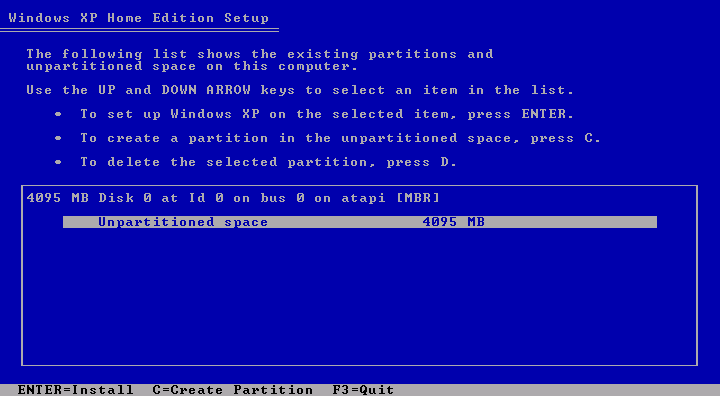
Partitioning and Formatting the Hard Drive
Next, we’re taken to a menu
that allows us to partition your new hard drive (Figure 135).
Think of partitioning a hard drive as breaking it up into sections.
After partitioning, each partition or section will then be formatted
so that it can be read by various operating systems. One of the original
purposes of partitioning a hard drive was to allow the hard drive to
support multiple operating systems. Each operating system could be given
its own partition, which could then be formatted for that operating
system.
The onscreen message says “Press
C” to partition and we do. The screen tells us that 76309 MB is
available for partitioning our 80 GB drive.
NOTE: For the photos in this
book, we partitioned a 4 GB virtual drive which shows 4095 MB as available
(as in Figure 135).
That’s about 4 GB. We’ll make the Windows Partition 2000 MB
(about 2 GB) (see Figure 136).
We’ll leave 2000 MB unpartitioned to demonstrate a dual boot operating
system, where Linux is installed into the unpartitioned and unformatted
part of the disk. Your PC will show far larger numbers for available
space. Today, a 2 GB partition is small!
Figure 135: Unpartitioned space on the hard drive Notice we only have 4095 MB (about 4 GB) of unpartitioned space. This is because we partitioned a virtual hard drive (VMWare) so we could get screen captures for this book. For an 80 GB drive, expect to see a number like 76309 MB, rather than 4095 MB.
|
|
Quick navigation to subsections and regular topics in this section
|
| If you find The PC Guide useful, please consider making a small Paypal donation to help the site, using one of the buttons below. You can also donate a custom amount using the far right button (not less than $1 please, or PayPal gets most/all of your money!) In lieu of a larger donation, you may wish to consider buying the inexpensive print version of How to Build Your Own PC, direct from the author. Thanks for your support! |
|
|
Home -
Table Of Contents - Contact Us
How to Build Your Own PC (http://www.PCGuide.com/byop/) on PCGuide.com
Version 1.0 - Version Date: May 4, 2005
Adapted with permission from a work created by Charlie Palmer.
PCGuide.com Version © Copyright 2005 Charles M. Kozierok. All Rights Reserved.
Not responsible for any loss resulting from the use of this site.
|


