| Get How to Build Your Own PC in print for just $21.95 |
Click Here!
|
|
|
Choosing the File System for the New Partition
After partitioning the hard drive,
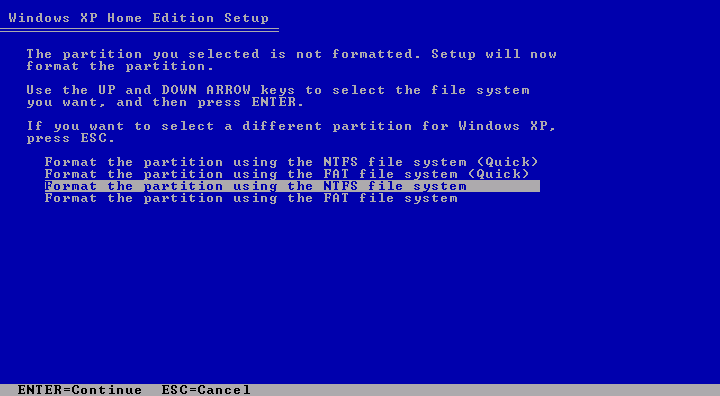
a format screen appears automatically, and gives you a choice of file
system for formatting (Figure 138).
The file system describes the way that the operating system stores information
on the hard drive. To format 40 GB as one partition, we’ll use
NTFS file system, which stands for New Technology File System. OTFS
or Old Technology File System is called FAT. FAT stands for File Allocation
Table.
Figure 138: We choose to format the partition with NTFS
|
Either NTFS or FAT is basically
a way of keeping track of where information is stored on the disk. Information
is divided into what are called clusters. NTFS or FAT lets us find clusters
of information on the hard drive.
Imagine having a big house and a
small notebook. Each room in the house corresponds to a cluster. Every
time you purchase something to put in the house, you place it in one
of the rooms and record which room the item is in, in your notebook.
Then, if you ever want to get the item, you look at your notebook to
find the room. NTFS has a bigger notebook than FAT. NTFS also has better
security, so people don’t break into your house.
NTFS allows us to make larger partitions,
and it’s generally considered superior to FAT. If the partition
must be read by Windows 98, FAT is necessary. FAT16 volumes are limited
to 2 GB. That is why systems running Windows 95 that had large hard
drives needed to have many drive letters: C, D, E... each only containing
2 GB. You can have one big C drive with NTFS. There are also two versions
of FAT known as FAT16 and FAT32. If you use Windows 98, you’ll
probably use FAT32. However, if you don’t need to use Windows 98
and only plan to use Windows XP, use NTFS as your file system.
| If you find The PC Guide useful, please consider making a small Paypal donation to help the site, using one of the buttons below. You can also donate a custom amount using the far right button (not less than $1 please, or PayPal gets most/all of your money!) In lieu of a larger donation, you may wish to consider buying the inexpensive print version of How to Build Your Own PC, direct from the author. Thanks for your support! |
|
|
Home -
Table Of Contents - Contact Us
How to Build Your Own PC (http://www.PCGuide.com/byop/) on PCGuide.com
Version 1.0 - Version Date: May 4, 2005
Adapted with permission from a work created by Charlie Palmer.
PCGuide.com Version © Copyright 2005 Charles M. Kozierok. All Rights Reserved.
Not responsible for any loss resulting from the use of this site.
|


