| Get the entire How to Build Your Own PC in affordable hard copy |
Click Here!
|
|
|
Partitioning for Multiple Operating Systems
If you plan to install a dual boot
operating system, it’s good to decide how much hard drive space
you want allocated for each system. For example, if you have an 80 GB
drive, and you primarily run Windows, but you’d like to experiment
with Linux, you might allow 60 GB (about 60000 MB) for a Windows partition.
Then, use the remaining 20 GB for installing a Linux partition. If you
plan to actively use both Windows and Linux, you might decide to enter
half of the maximum disk space as the Windows partition. Then, the other
half can be used for Linux.
If you plan to dual boot with Windows
98 and Windows XP (or triple boot Windows 98, Windows XP, and Linux),
you’ll want to leave enough drive space for another partition (which
will be FAT formatted), because Windows 98 only recognizes FAT formatted
partitions. Install Windows 98 first.
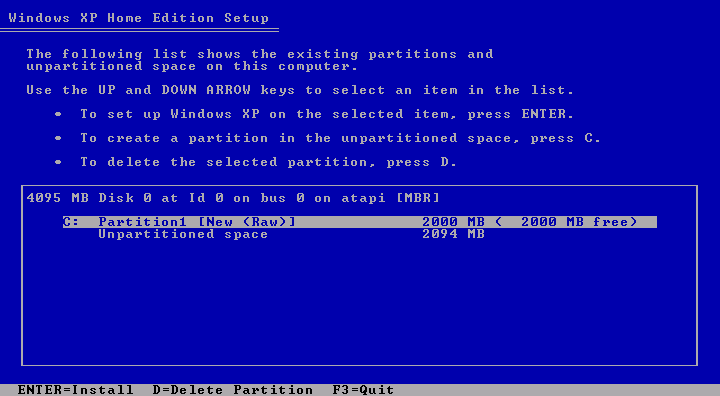
After we choose how large to make
the Windows partition, we hit “enter” to see the new partitioning
information (Figure 137).
You can see the space that has been left unpartitioned. To do the actual
partitioning, we hit “enter” again which installs the partition
to the hard drive.
Figure 137: Reserving space for a second operating system We’ve created the 2000 MB partition and have 2000 MB remaining unpartitioned for Linux (to be installed later). If you change your mind and want to use a smaller or larger partition, hit D. Otherwise, hit ENTER to begin formatting and to set up Windows XP.
Notice: Our 2000 MB partition is small, because we’re actually partitioning a virtual drive. Your partition should probably be at least 40000 MB.
|
| If you find The PC Guide useful, please consider making a small Paypal donation to help the site, using one of the buttons below. You can also donate a custom amount using the far right button (not less than $1 please, or PayPal gets most/all of your money!) In lieu of a larger donation, you may wish to consider buying the inexpensive print version of How to Build Your Own PC, direct from the author. Thanks for your support! |
|
|
Home -
Table Of Contents - Contact Us
How to Build Your Own PC (http://www.PCGuide.com/byop/) on PCGuide.com
Version 1.0 - Version Date: May 4, 2005
Adapted with permission from a work created by Charlie Palmer.
PCGuide.com Version © Copyright 2005 Charles M. Kozierok. All Rights Reserved.
Not responsible for any loss resulting from the use of this site.
|


