| Get How to Build Your Own PC in print for just $21.95 |
Click Here!
|
|
|
Formatting the New Partition
In practice, all you really need
to know about NTFS is that when you’re prompted to format the system,
you select the NTFS option. To select NTFS, press “ENTER,”
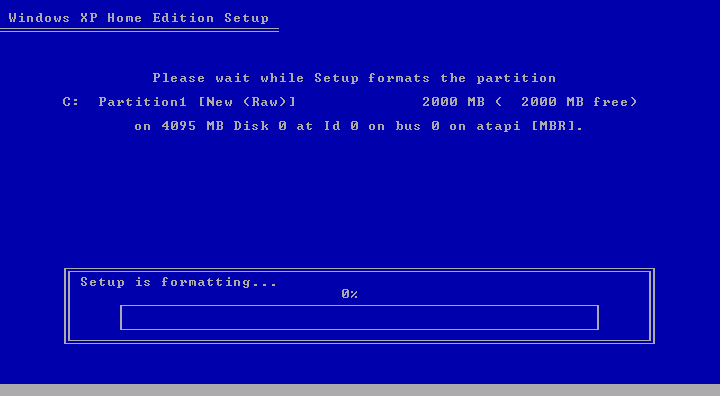
and let the computer partition the hard drive. A status bar shows us
the formatting progress (Figure 139).
Figure 139: Formatting The status bar will tell you of the progress. For a large hard drive, feel free to take a break and check back on the progress later.
|
The format program will
also ask if you want to do a quick format or a full format. Select full
format. That is usually the best option and also the default option
Windows offers.
| If you find The PC Guide useful, please consider making a small Paypal donation to help the site, using one of the buttons below. You can also donate a custom amount using the far right button (not less than $1 please, or PayPal gets most/all of your money!) In lieu of a larger donation, you may wish to consider buying the inexpensive print version of How to Build Your Own PC, direct from the author. Thanks for your support! |
|
|
Home -
Table Of Contents - Contact Us
How to Build Your Own PC (http://www.PCGuide.com/byop/) on PCGuide.com
Version 1.0 - Version Date: May 4, 2005
Adapted with permission from a work created by Charlie Palmer.
PCGuide.com Version © Copyright 2005 Charles M. Kozierok. All Rights Reserved.
Not responsible for any loss resulting from the use of this site.
|


