| Get How to Build Your Own PC in print for just $21.95 |
Click Here!
|
|
|
Installing the CD-RW Ribbon Cable
While each ribbon connector can have
a primary and a secondary device on it, most mainboards also support
two IDE connectors on the mainboard, which are also referred to as primary
and secondary. We’ll connect the secondary IDE to the CD cable
first, because it’s between the floppy connector and the mainboard’s
primary IDE connector (see Figure 91).
Then, we’ll connect the primary mainboard IDE connector to the
hard drive. To determine which IDE connector is primary, consult your
mainboard manual. Any IDE ribbon cables you connect in the future will
be similar to these.
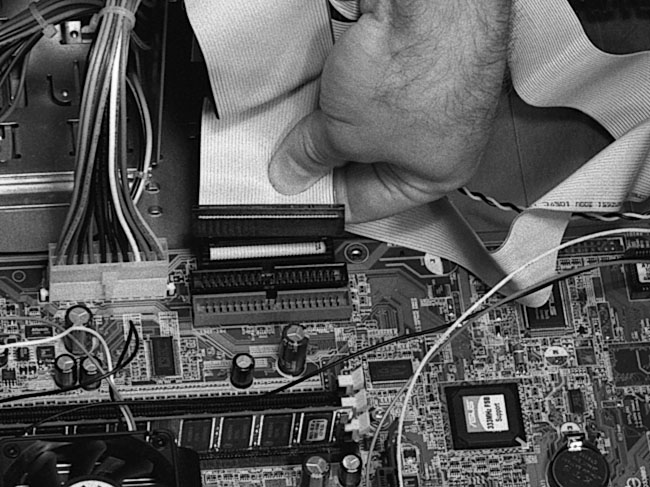
First, connect the 40-pin ribbon
cable to the mainboard’s secondary controller (the second IDE connection
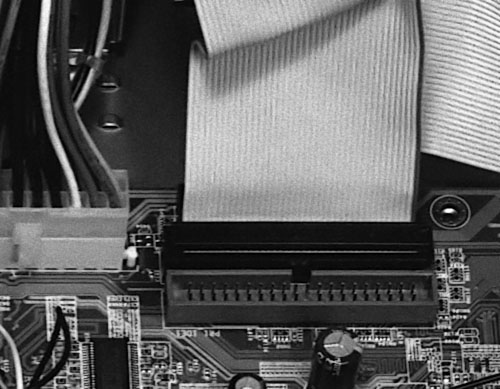
on the mainboard) as shown in Figure 95
and Figure 96.
Figure 95: Connecting the CD-RW ribbon cable to the secondary IDE connector on the mainboard
|
Figure 96: CD-RW ribbon connected to mainboard
|
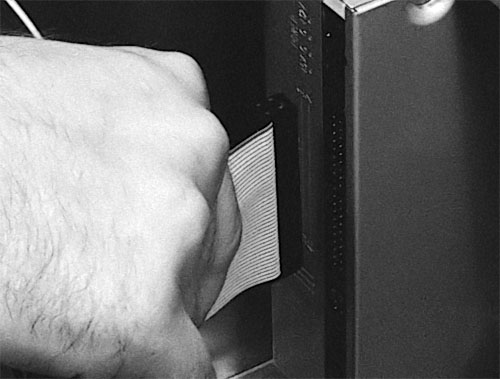
Then, connect the cable
to the CD-RW drive (Figure 97).
Ignore any connectors in the middle of the cable and use the ends of
the ribbon cable (unless you plan to connect a secondary device to the
middle cable connector).
Figure 97: Connecting the ribbon cable to the CD-RW drive Hold the connector by the black end to push it in. We intentionally had the model hold the connector by the cable so the hand didn’t completely obscure the picture. Also, when removing cables, don’t pull them by the ribbon, which could damage wires. Rather, pull them out by holding the black connector. (Figure 88 shows the back of the CD-RW drive, where the ribbon cable goes.)
|
| If you find The PC Guide useful, please consider making a small Paypal donation to help the site, using one of the buttons below. You can also donate a custom amount using the far right button (not less than $1 please, or PayPal gets most/all of your money!) In lieu of a larger donation, you may wish to consider buying the inexpensive print version of How to Build Your Own PC, direct from the author. Thanks for your support! |
|
|
Home -
Table Of Contents - Contact Us
How to Build Your Own PC (http://www.PCGuide.com/byop/) on PCGuide.com
Version 1.0 - Version Date: May 4, 2005
Adapted with permission from a work created by Charlie Palmer.
PCGuide.com Version © Copyright 2005 Charles M. Kozierok. All Rights Reserved.
Not responsible for any loss resulting from the use of this site.
|


