| Get the entire How to Build Your Own PC in affordable hard copy |
Click Here!
|
|
|
The Floppy Ribbon Cable
With bootable CD drives today and
the limited capacity of floppies, they’re not used very often.
But, they can be useful for creating an emergency boot disk. And, if
you have a case, such as the Enlight case for this build, with a hole
for a floppy, it’s probably good to have something installed behind
the floppy hole, because someone will eventually try to insert a floppy
disk. Plus, for $15, a floppy is inexpensive.
The floppy drive is connected with
the 34-pin ribbon cable (Figure 2)
which comes with your mainboard. It won’t plug into the forty-pin
socket used for the hard drive and CD-RW drive. There’d be pins
left over.
If you examine one end of the floppy
cable connector, you’ll see that there is a single hole missing
in the connector. If I recall right from math, a negative times a negative
is a positive. So, lack of a hole means material still remains. The
other end of the cable is also missing a hole. This missing hole can
be matched with a missing pin (on a drive or mainboard) to help orient
the connector.
There is also sometimes a protruding
notch on one side of each connector at the top and outside part of the
connector. This notch will match up with a notch in the mainboard floppy
socket. This helps to assure the ribbon cable is installed in the proper
orientation. Sometimes, your ribbon cable will also have a red stripe
down one side. Red means Pin 1. Or, sometimes, there will be something
else, such as a red triangle, showing Pin 1. Pin 1 will be noted in
your mainboard manual.
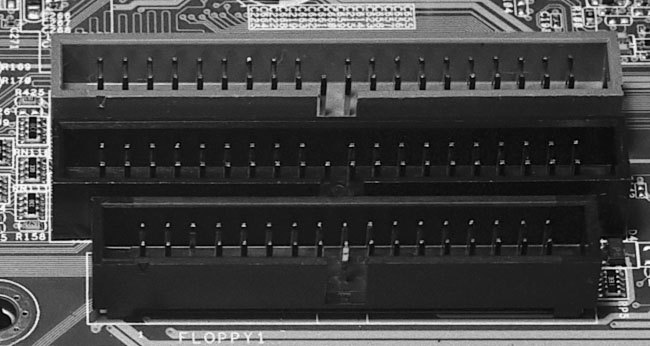
Find the 34-pin floppy connector
on your mainboard (Figure 91).
When in doubt, consult the mainboard manual. Examine the pins carefully.
You’ll see there is a missing pin. That’s normal. It will
match up with the lack of a hole in the ribbon connector. Be careful
not to force a connector in the wrong orientation, or you might damage
or bend a pin.
Figure 91: IDE and floppy connector sockets on mainboard The bottom connector is for a 34-pin floppy ribbon cable. Notice the cut-out notch on one side which helps orient the cable. Be careful not to bend any pins as you press the connector into place. The light-colored 40-pin connector is the mainboard’s primary IDE connector and should be connected to the hard drive. The two 40-pin IDE connectors support up to four devices.
|
You’ll also see a
cut-out notch on one long side of the socket. This is designed to help
assure proper orientation of the floppy cable. However, some cables
don’t have notches. So, sometimes the cut out isn’t much help.
If there is a notch on the cable,
use it to determine the proper orientation of the cable. If your cable
has no notch, either match up the missing hole with the missing pin,
or else use your mainboard manual to determine Pin 1 of the floppy connector
and match that to the red stripe of the floppy cable. One way or another,
you’ll get that sucker installed in the proper orientation.
Similarly, the floppy drive itself
is missing one pin on the connector, so you can use that as a guide
for the proper orientation of the cable to the drive. Other floppy drives
have Pin 1 marked in some other way. Pin 1 always goes to the red line
side of the cable. And, if you really must confirm orientation yet another
way, you can do a search on google for your particular floppy drive
to find a manual for your floppy or more information about it. Most
floppy drives don’t come with any documentation.
| If you find The PC Guide useful, please consider making a small Paypal donation to help the site, using one of the buttons below. You can also donate a custom amount using the far right button (not less than $1 please, or PayPal gets most/all of your money!) In lieu of a larger donation, you may wish to consider buying the inexpensive print version of How to Build Your Own PC, direct from the author. Thanks for your support! |
|
|
Home -
Table Of Contents - Contact Us
How to Build Your Own PC (http://www.PCGuide.com/byop/) on PCGuide.com
Version 1.0 - Version Date: May 4, 2005
Adapted with permission from a work created by Charlie Palmer.
PCGuide.com Version © Copyright 2005 Charles M. Kozierok. All Rights Reserved.
Not responsible for any loss resulting from the use of this site.
|


