| Read up on building your PC, anywhere you go! |
Click Here!
|
|
|
Basic Steps in Building Your PC
Building your own PC involves selecting
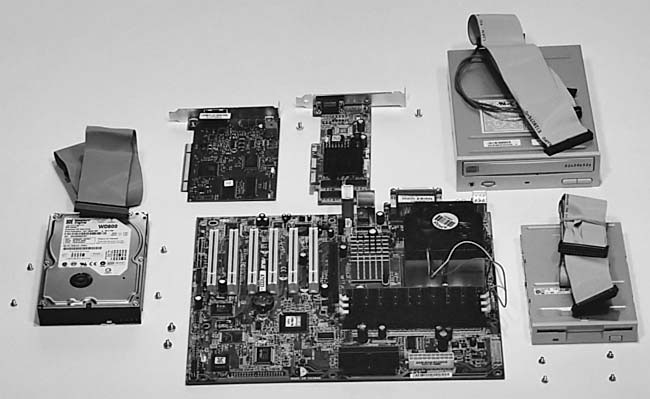
and buying a few key components (see Figure 1)
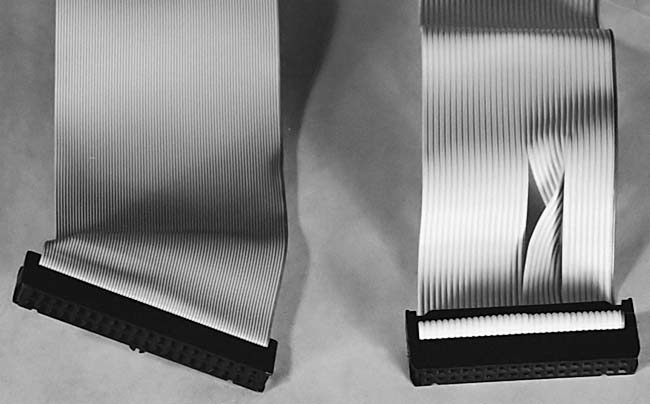
and then connecting them together with ribbon cables (Figure 2)
and other standard connectors that are usually provided with the components.
For example, most power connectors come permanently attached to the
power supply which itself usually comes with your computer case.
Figure 1: All the parts you need to build your own PC, except the case In front is a mainboard with RAM, CPU, and heatsink installed. Above the mainboard are an AGP video card and a PCI modem card. To the left is the hard drive with its ribbon cable. To the right is the CD-RW drive and floppy drive.
|
Some components, such as
PCI expansion cards and the mainboard, will also require using a Phillips
screwdriver to secure them properly. A Phillips screwdriver is probably
the only tool you’ll need. A small flat-nosed screwdriver is sometimes
useful for prying out PCI expansion slot covers or the case’s I/O
shield. If you have short fingernails and you need to change jumpers,
a needle-nose pliers is sometimes handy.
Figure 2: Ribbon cables . On the left is a hard drive ribbon cable. On the right is a floppy drive ribbon cable. Notice the twist in the floppy cable. The end with the twist plugs into the floppy drive. The other end plugs into the mainboard.
|
After assembling your computer,
you’ll need to install an operating system, which is really just
a software procedure. It’s common to talk about “installing”
software, even though it only involves inserting CDs into the CD drive
as required.
Your PC will be fully assembled before
we install software. We’ll take you through installing an operating
system step-by-step in detail in another chapter.
You may also want to examine and/or
modify your system’s BIOS, which we’ll discuss later. Many
times, you’ll be able to get your PC up and running adequately
without tinkering with the mainboard’s BIOS at all. But, tweaking
the BIOS may enhance your system’s performance. Make changes to
BIOS very carefully. For example, if you update your mainboard’s
BIOS with Flash BIOS and your computer hangs, it’s possible your
PC will no longer boot at all.
We’ll also discuss partitioning
and formatting a hard drive. But, first, we need to get our parts together.
| If you find The PC Guide useful, please consider making a small Paypal donation to help the site, using one of the buttons below. You can also donate a custom amount using the far right button (not less than $1 please, or PayPal gets most/all of your money!) In lieu of a larger donation, you may wish to consider buying the inexpensive print version of How to Build Your Own PC, direct from the author. Thanks for your support! |
|
|
Home -
Table Of Contents - Contact Us
How to Build Your Own PC (http://www.PCGuide.com/byop/) on PCGuide.com
Version 1.0 - Version Date: May 4, 2005
Adapted with permission from a work created by Charlie Palmer.
PCGuide.com Version © Copyright 2005 Charles M. Kozierok. All Rights Reserved.
Not responsible for any loss resulting from the use of this site.
|


