| Get How to Build Your Own PC in print for just $21.95 |
Click Here!
|
|
|
Testing the Floppy Drive’s Fit in the Case
The Enlight case has the floppy drive
sit behind the bezel. This means the floppy drive can’t protrude
too much or you won’t be able to close the front of the case. To
get the depth correct, this cage has exact holes in the cage to position
the drive and tighten it into place. But, just to make it challenging,
there are two different sets of holes to allow the drive to seat at
two different depths. If, as you close the bezel, you find the floppy
drive doesn’t sit at the proper depth, just remove the floppy and
try the other set of cage holes. I’d recommend starting with the
set of holes that puts the floppy the farthest back. When closing the
front of the case (bezel), never force it. It could be that the floppy
drive protrudes too far.
Other cages, where the front of the
floppy drive is flush with the front of the case, often have slots which
allow you to adjust the drive back and forth until it’s exactly
flush with the front of the case. Then you can screw the floppy drive
into place. Sometimes the slots are a bit oversized and the small screw
heads will have a poor grip on the slot.
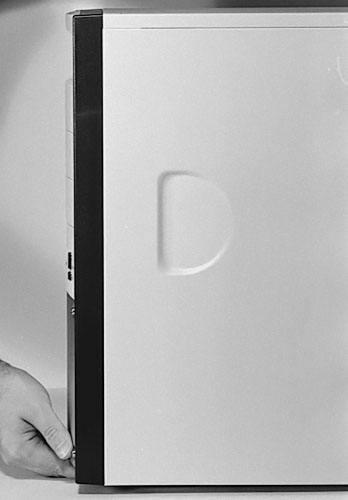
Let’s put the cage back into
the PC and gently try to close the front (Figure 77).
If the front doesn’t close properly, we can see the drive protrudes
too much, and we’ll need to use the other set of cage screw holes
to move the drive back. Be sure when you close the front of the case
that something isn’t preventing it from closing, such as a floppy
drive that’s sticking out too far. With too much force, it’s
possible to break the bezel. You might want to close the front with
no drives installed, just to get a feel for how much force it takes
to finally pop the bezel into place.
Figure 77: Testing the fit of the bezel After installing the floppy in the cage and replacing the cage in the PC case, we gently try to close the bezel. This step isn’t formally required. But, we want to be sure the floppy sits at the correct depth. If it sits too far forward, the bezel won’t shut. Or, it could break. When closing the bezel, it’s handy to lift the case up in the front and use your fingers to depress the bezel latch before closing the case. This saves wear and tear on the latch. Some people just slam it shut, which is bad.
Whenever closing anything, always keep an eye out for wires or anything else that could get pinched and be sure obstructions are moved out of the way.
|
| If you find The PC Guide useful, please consider making a small Paypal donation to help the site, using one of the buttons below. You can also donate a custom amount using the far right button (not less than $1 please, or PayPal gets most/all of your money!) In lieu of a larger donation, you may wish to consider buying the inexpensive print version of How to Build Your Own PC, direct from the author. Thanks for your support! |
|
|
Home -
Table Of Contents - Contact Us
How to Build Your Own PC (http://www.PCGuide.com/byop/) on PCGuide.com
Version 1.0 - Version Date: May 4, 2005
Adapted with permission from a work created by Charlie Palmer.
PCGuide.com Version © Copyright 2005 Charles M. Kozierok. All Rights Reserved.
Not responsible for any loss resulting from the use of this site.
|


