| Get How to Build Your Own PC in print for just $21.95 |
Click Here!
|
|
|
Securing the Heatsink Clip
The heatsink clip is made of spring
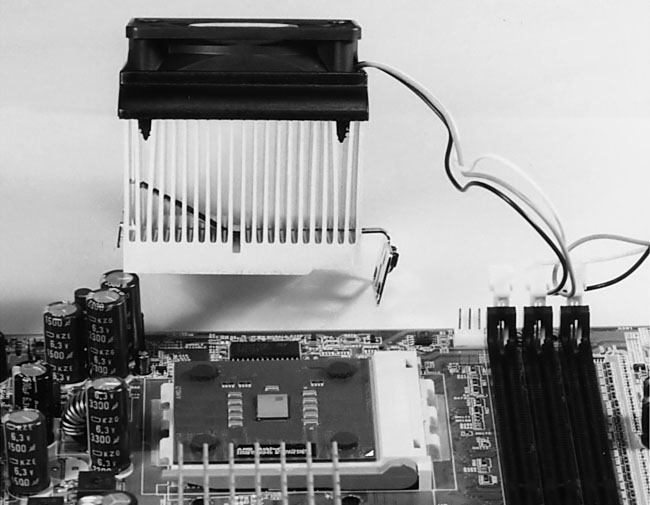
steel and its tension holds the heatsink firmly against the CPU (see
Figure 34).
Figure 34: Heatsink Clip Looking through the fins of the heatsink, we see that the clip isn’t symmetrical. The point of the clip will push down on the CPU die when properly installed.
|
Use a flat-head screwdriver
or “other appropriate tool” to secure the clip to the other
side of the CPU socket. Place the screwdriver into the clip opening
for it and gently push down and slightly away from the CPU socket, allowing
the clip to clear the three notches of the CPU socket. Then, push the
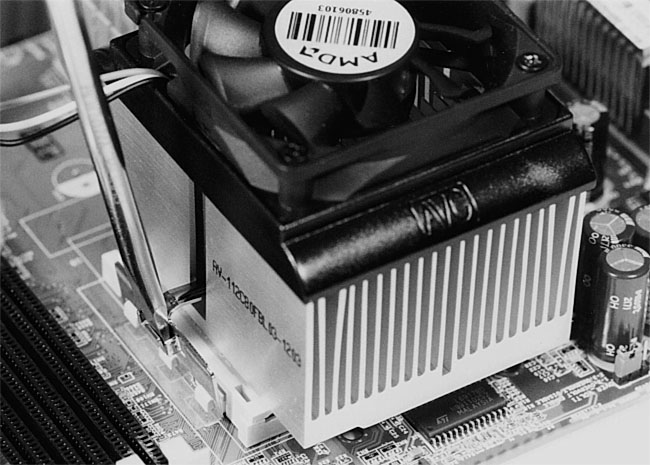
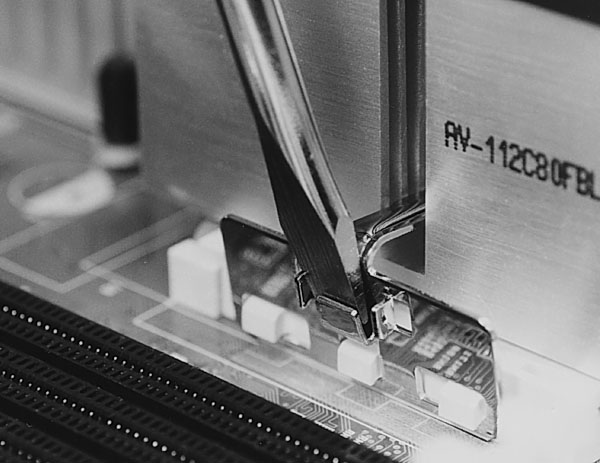
clip back toward the socket, engaging the three notches (see Figure 35
and Figure 36).
Figure 35: Securing the heatsink Be gentle and avoid putting unnecessary force on the clip and the CPU socket.
|
Figure 36: Engaging the clip of the heatsink. This “appropriate tool” (flat-head screwdriver) allows you to push the clip down and lock it into place. The other end of the clip is already engaged to the notches of the CPU socket on the other side of the heatsink. Be sure to select a tool that won’t slip and damage the mainboard. Do not push down on the heatsink itself. The clip will push the heatsink down naturally and allow it to contact the die of the CPU.
|
If you read the AMD instructions
for installing the Athlon, they say to use the “appropriate tool”
to secure the clip, but they give absolutely no clue as to what that
tool is. Pliers? Hammer? Power Drill? Weed Eater?
The heatsink here seems to have a
natural affinity for a flat-head screwdriver, and that tool works well
here, so it’s the one we’ll use. Be careful so that the tool
doesn’t slip and damage the mainboard. Don’t use an “inappropriate”
tool which you think might slip.
The AMD heatsink puts considerable
force on the notches that the heatsink locks into. Because of this,
be gentle when using the screwdriver to push down and lock in the heatsink.
Don’t push the lever much farther down than necessary to secure
the heatsink.
| If you find The PC Guide useful, please consider making a small Paypal donation to help the site, using one of the buttons below. You can also donate a custom amount using the far right button (not less than $1 please, or PayPal gets most/all of your money!) In lieu of a larger donation, you may wish to consider buying the inexpensive print version of How to Build Your Own PC, direct from the author. Thanks for your support! |
|
|
Home -
Table Of Contents - Contact Us
How to Build Your Own PC (http://www.PCGuide.com/byop/) on PCGuide.com
Version 1.0 - Version Date: May 4, 2005
Adapted with permission from a work created by Charlie Palmer.
PCGuide.com Version © Copyright 2005 Charles M. Kozierok. All Rights Reserved.
Not responsible for any loss resulting from the use of this site.
|


