| Get How to Build Your Own PC in print for just $21.95 |
Click Here!
|
|
|
Checking Installation and Connecting the Fan
The installation instructions say
you should examine the seating of the heatsink to be sure it’s
resting properly on the die. In practice, it’s difficult if not
impossible to do this (see Figure 33).
But, if you have a good light handy, you can peek between the heatsink
and the CPU if you want. (Incidentally, a Mini-Mag AA flashlight is
a great tool to have handy here.)
Finally, examine the mainboard manual
and see where the three-pin CPU fan power connection pins are. They’re
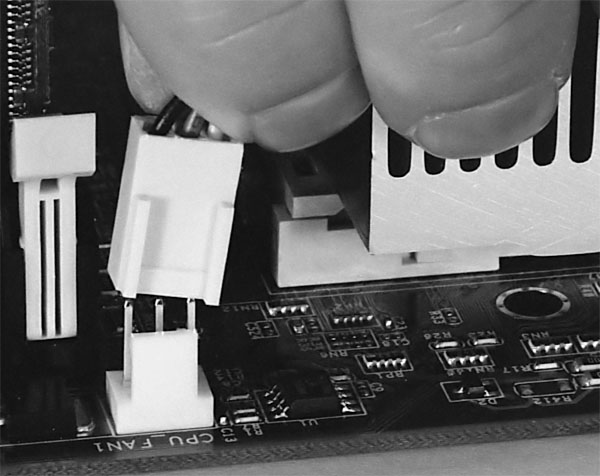
usually clearly marked. Then, plug in the heatsink fan (Figure 37).
Don’t forget to plug in the heatsink/CPU fan! Do this immediately
after the heatsink is installed! If the heatsink fan isn’t
plugged in, it won’t work and your CPU will overheat. When your
system is fully assembled, it’s a good idea to leave the side of
the case off and examine all of the fans to be sure they’re operating
properly.
Figure 37: Plugging the heatsink fan into the mainboard Notice the post shows us the proper orientation. IMPORTANT! DO NOT FORGET THIS STEP! Failure to properly cool the Athlon CPU will damage it. When you first start your system, leave the side panel of the PC case off and examine all fans to be sure they are spinning rapidly.
|
While the thermal grease
and the connection between the CPU die and the heatsink allow heat to
be conducted away from the CPU, the heat builds up on the fins
of the heatsink where the fan dissipates it from there. The fins spread
this heat over a large area, and the fan helps blow the heat away.
You now have your CPU and heatsink
properly installed on your mainboard. Well done!
| If you find The PC Guide useful, please consider making a small Paypal donation to help the site, using one of the buttons below. You can also donate a custom amount using the far right button (not less than $1 please, or PayPal gets most/all of your money!) In lieu of a larger donation, you may wish to consider buying the inexpensive print version of How to Build Your Own PC, direct from the author. Thanks for your support! |
|
|
Home -
Table Of Contents - Contact Us
How to Build Your Own PC (http://www.PCGuide.com/byop/) on PCGuide.com
Version 1.0 - Version Date: May 4, 2005
Adapted with permission from a work created by Charlie Palmer.
PCGuide.com Version © Copyright 2005 Charles M. Kozierok. All Rights Reserved.
Not responsible for any loss resulting from the use of this site.
|


