| Get the entire How to Build Your Own PC in affordable hard copy |
Click Here!
|
|
|
Seating the Heatsink
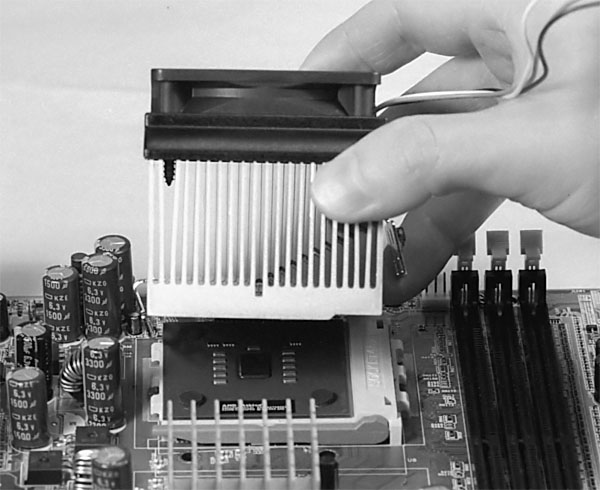
Seat the heatsink on top of the CPU
(see Figure 32),
manipulating the shorter end of the clip so that the three holes of
the clip engage the bottom of the three notches of the CPU socket. Don’t
push the heatsink down. That’s done naturally by the heatsink clip
as the clip is secured. Do examine the edges of the heatsink to be sure
the heatsink isn’t hitting anything besides the four feet it’s
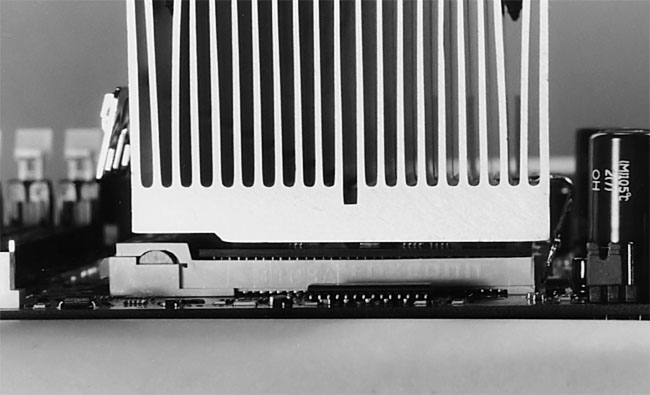
supposed to rest on; when the CPU is in place it should look something
like Figure 33.
Figure 32: Placing the heatsink Notice the cut-out notch on the bottom of the heatsink that matches up with the high end of the CPU socket. Be sure to install the heatsink in the proper orientation.
|
Figure 33: Heatsink sitting on CPU Notice the notch in the heatsink at the left, which fits the raised portion of the CPU socket.
|
| If you find The PC Guide useful, please consider making a small Paypal donation to help the site, using one of the buttons below. You can also donate a custom amount using the far right button (not less than $1 please, or PayPal gets most/all of your money!) In lieu of a larger donation, you may wish to consider buying the inexpensive print version of How to Build Your Own PC, direct from the author. Thanks for your support! |
|
|
Home -
Table Of Contents - Contact Us
How to Build Your Own PC (http://www.PCGuide.com/byop/) on PCGuide.com
Version 1.0 - Version Date: May 4, 2005
Adapted with permission from a work created by Charlie Palmer.
PCGuide.com Version © Copyright 2005 Charles M. Kozierok. All Rights Reserved.
Not responsible for any loss resulting from the use of this site.
|


