| Read up on building your PC, anywhere you go! |
Click Here!
|
|
|
Orienting the Heatsink
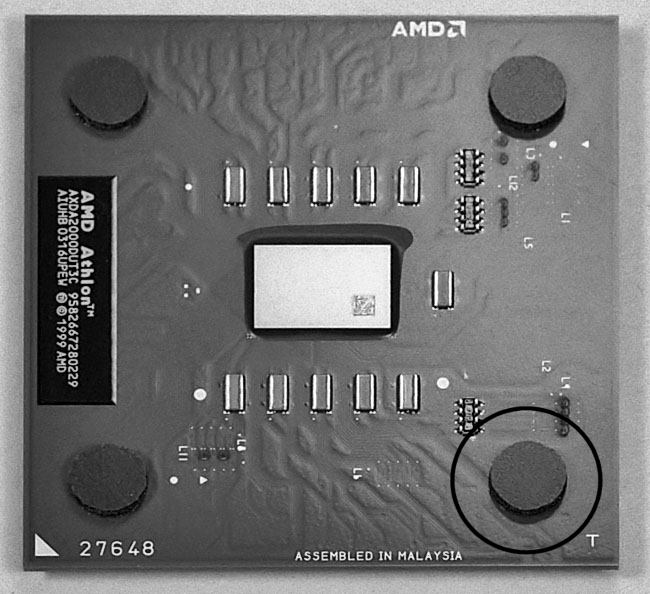
Examine the top of the Athlon CPU
and you’ll notice four feet (see Figure 31).
These feet are designed so that the heatsink/fan can be placed on top
of them. You need all four feet for proper seating of the heatsink.
The feet should already be in place and ready to go. When the heatsink
is secured, these feet will compress slightly, allowing the heatsink
to contact the CPU die.
Figure 31: Feet on the CPU chip This is the same chip shown in Figure 16, but with one of the four feet circled. The heatsink sits on these feet which compress slightly. Notice the small square at the center. That’s the CPU die. When the heatsink pushes down on the CPU feet, it will contact the die allowing heat to be effectively conducted to the heatsink.
This figure shows the top of the CPU chip. The bottom of the chip has many little pins which will insert into the CPU socket shown in Figure 26.
|
Examine the center of the
CPU (inside the four feet). You’ll see a small square, which is
called the die. The die is important, because it will get really hot
and heat will need to be drawn away from it. This will occur by allowing
the die to thermally contact the metal of the heatsink. This effectively
increases the thermal mass of the die and allows heat to be dissipated
into the PC case. A CPU fan will blow air through the heatsink. Other
fans will circulate air in the PC case and remove the heat from the
PC.
Examining the heatsink, you might
guess that it can be installed in any direction. You might guess that
you can just set it on top of the CPU in any orientation (Figure 4.8).
This isn’t so. Examine the bottom of the heatsink (Figure 4.9)
and you’ll see that one edge of the heatsink is slightly indented
or cut away. This allows that edge of the heatsink to clear the top
of the CPU socket (the part of the socket from which the lever pivots
from, which is a bit higher than the rest of the socket). So, you’ll
need to pay attention to orientation.
Also, if you look through the fins
of the heatsink (Figure 4.10), you’ll see that the metal clip that
will be used to secure the heatsink to the CPU socket isn’t symmetrical.
One side of the clip is shorter than the other. When the heatsink is
seated properly, the clip is designed so that it will push the heatsink
down onto the CPU, and the force from the clip will be directly above
the CPU die.
| If you find The PC Guide useful, please consider making a small Paypal donation to help the site, using one of the buttons below. You can also donate a custom amount using the far right button (not less than $1 please, or PayPal gets most/all of your money!) In lieu of a larger donation, you may wish to consider buying the inexpensive print version of How to Build Your Own PC, direct from the author. Thanks for your support! |
|
|
Home -
Table Of Contents - Contact Us
How to Build Your Own PC (http://www.PCGuide.com/byop/) on PCGuide.com
Version 1.0 - Version Date: May 4, 2005
Adapted with permission from a work created by Charlie Palmer.
PCGuide.com Version © Copyright 2005 Charles M. Kozierok. All Rights Reserved.
Not responsible for any loss resulting from the use of this site.
|


