| Get How to Build Your Own PC in print for just $21.95 |
Click Here!
|
|
|
Seating the AGP Video Card in the Slot
After removing the slot cover, find
a small, coarse screw from the set of screws that came with your PC
case. It’s a good idea to test the screw above its slot. Some cases
have poorly tapped threads, and the screws sometimes cut their own path
into the case as you tighten them. Other cases are better. The screws
go in easily and come out easily.
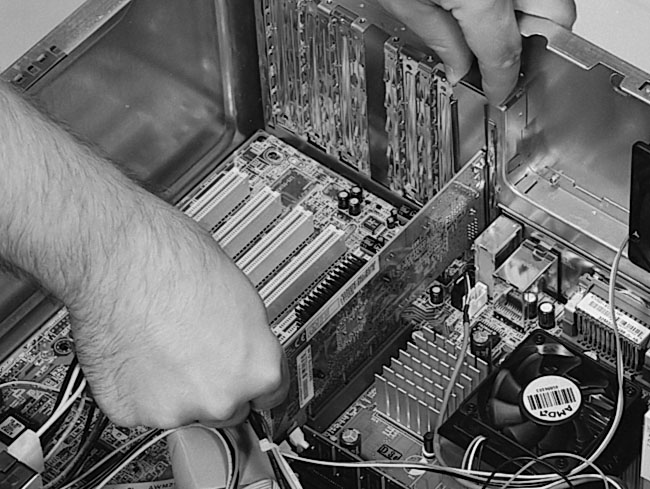
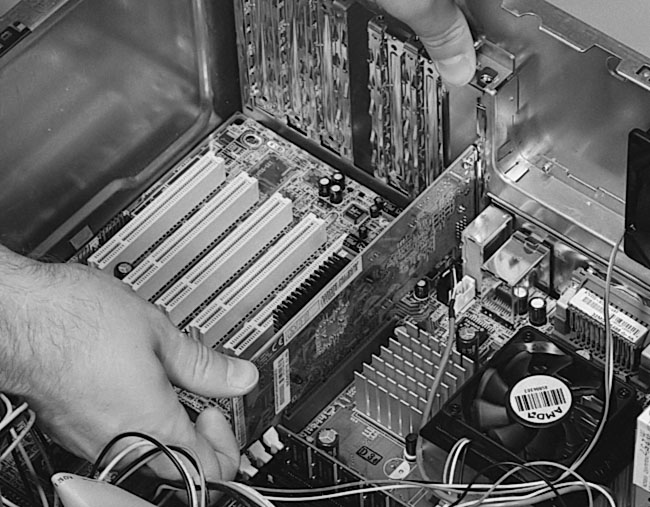
Now that you have a screw and your
Phillips screwdriver handy, pick up the AGP video card and position
it above its slot. Push down on the card to get it to seat in its slot.
The slight lever with the protrusion at the back can be pressed in with
your fingers to allow the card to clear the protrusion (Figure 118
and Figure 119).
Figure 118: Placing the AGP video card in its slot
|
Figure 119: Pushing the AGP card down with the thumbs
|
Sometimes pushing one end
of the card in first helps seat it more easily, but toward the end when
you’re pushing the card into its final place, you want uniform
pressure at both ends of the card so that the leads seat fully along
the entire card. Give the card an extra little push to be sure it’s
fully seated.
| If you find The PC Guide useful, please consider making a small Paypal donation to help the site, using one of the buttons below. You can also donate a custom amount using the far right button (not less than $1 please, or PayPal gets most/all of your money!) In lieu of a larger donation, you may wish to consider buying the inexpensive print version of How to Build Your Own PC, direct from the author. Thanks for your support! |
|
|
Home -
Table Of Contents - Contact Us
How to Build Your Own PC (http://www.PCGuide.com/byop/) on PCGuide.com
Version 1.0 - Version Date: May 4, 2005
Adapted with permission from a work created by Charlie Palmer.
PCGuide.com Version © Copyright 2005 Charles M. Kozierok. All Rights Reserved.
Not responsible for any loss resulting from the use of this site.
|


