| Get the entire How to Build Your Own PC in affordable hard copy |
Click Here!
|
|
|
Finding and Removing the AGP Slot Cover
Place your AGP card above its AGP
slot to determine which expansion slot cover it uses on the back of
the case. Carefully set the AGP card down and remove the appropriate
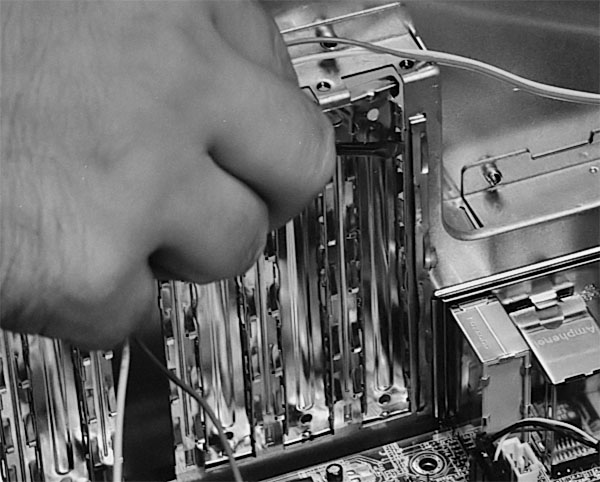
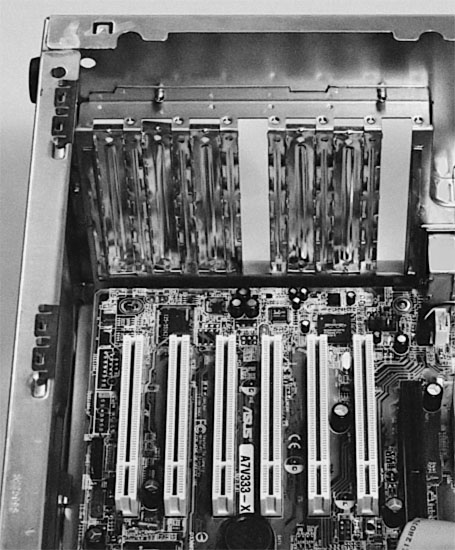
expansion slot cover from the case (Figure 116
and Figure 117).
Figure 116: Using a small, flat screwdriver to remove the AGP slot cover
|
Figure 117: AGP slot cover and one PCI slot cover removed from the back of the case External devices can connect through the back of the case to connectors on expansion cards. This allows your PC to interface to any external device.
|
Sometimes it’s necessary
to hold the card up to the slot to determine the correct slot cover
to remove. It’s easy to be off by one slot cover just by eyeballing
it. Often, there will be a single AGP slot at the far end of the PCI
expansion slots on the mainboard. If so, just remove the cover at the
far end. You can sometimes just count from one end to determine which
slot cover to remove. For example, this case has seven slot covers which
exactly match up with the six PCI expansion sockets and the one AGP
socket.
The Enlight case shown here has expansion
slot covers that are replaceable. Once removed, they can be put back
if you change your mind. Some slot covers are held in place by a single
screw, while others just hold themselves in. Unscrew the slot cover
to remove it, if it’s held in place by a screw.
Some cases have metal covers that
are held in by very tiny pieces of metal. Once removed, these covers
can’t be replaced. (You can always purchase solid metal covers
that screw into a slot closing it off, if you want). For this type of
slot cover, you need to bend the slot cover until the metal breaks to
remove the slot cover. Be careful of sharp edges.
| If you find The PC Guide useful, please consider making a small Paypal donation to help the site, using one of the buttons below. You can also donate a custom amount using the far right button (not less than $1 please, or PayPal gets most/all of your money!) In lieu of a larger donation, you may wish to consider buying the inexpensive print version of How to Build Your Own PC, direct from the author. Thanks for your support! |
|
|
Home -
Table Of Contents - Contact Us
How to Build Your Own PC (http://www.PCGuide.com/byop/) on PCGuide.com
Version 1.0 - Version Date: May 4, 2005
Adapted with permission from a work created by Charlie Palmer.
PCGuide.com Version © Copyright 2005 Charles M. Kozierok. All Rights Reserved.
Not responsible for any loss resulting from the use of this site.
|


