| Get the entire How to Build Your Own PC in affordable hard copy |
Click Here!
|
|
|
Opening and Examining the CPU Socket
First, raise the CPU socket lock
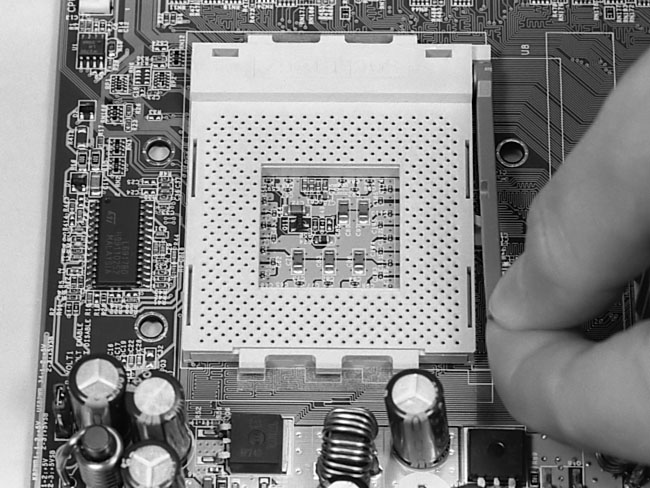
lever on the mainboard, as shown in Figure 25,
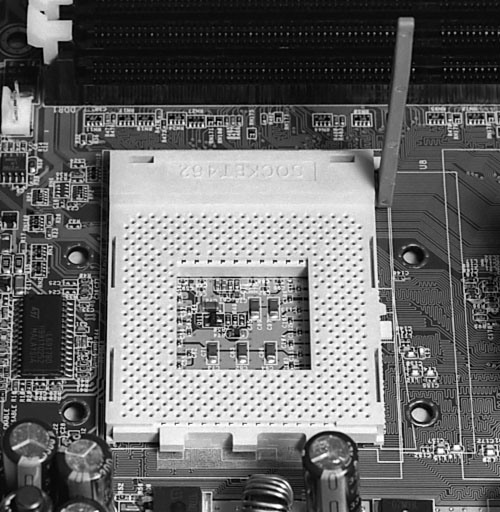
until the lever is fully opened. For the Athlon Socket A, this means
lifting the lever so it points straight up into the air (Figure 26).
A small notch locks the lever into place when it’s closed, so you’ll
need to pull the lever very gently away from the socket to clear the
closing notch when you first lift it.
Figure 25: Raising the lift lever on the CPU socket There is a notch at the side of the lever. Pull the lever gently away from the socket to clear the notch. Notice that the pin holes at the top on each side lack a hole for the corner pin. This configuration prevents the CPU from being inserted in the wrong orientation.
|
Figure 26: The socket lever is fully raised You can now place the CPU into the socket. You just need to set the CPU into the socket and close the lever.
|
Examine the pin holes of
the socket (socket pins). You’ll see that the pattern of the holes
will only allow insertion of a CPU in one orientation.
For the Athlon, you’ll see that
two of the corners have pin socket holes that end in a triangular formation,
i.e., they don’t use the pins at the very corners. Thus, if you
have the orientation of the CPU incorrect, a corner pin of the CPU won’t
have a hole to go into, and the CPU won’t seat into the socket.
This is designed to prevent people from inserting the CPU incorrectly
and damaging the CPU. Rest assured, it’s nearly impossible to insert
a CPU incorrectly.
The Athlon also has a small triangle
on the top of the chip to indicate its proper orientation.
| If you find The PC Guide useful, please consider making a small Paypal donation to help the site, using one of the buttons below. You can also donate a custom amount using the far right button (not less than $1 please, or PayPal gets most/all of your money!) In lieu of a larger donation, you may wish to consider buying the inexpensive print version of How to Build Your Own PC, direct from the author. Thanks for your support! |
|
|
Home -
Table Of Contents - Contact Us
How to Build Your Own PC (http://www.PCGuide.com/byop/) on PCGuide.com
Version 1.0 - Version Date: May 4, 2005
Adapted with permission from a work created by Charlie Palmer.
PCGuide.com Version © Copyright 2005 Charles M. Kozierok. All Rights Reserved.
Not responsible for any loss resulting from the use of this site.
|


