| Read up on building your PC, anywhere you go! |
Click Here!
|
|
|
Installing the New Driver
We double click on the vs-winXP.exe
program (anything ending in .exe is an executable program) and it installs
the proper monitor information.
In addition to drivers, there are
also .inf files which provide information about a device. A monitor
doesn’t actually have drivers. Monitors are driven by the video
card. So, the monitor “driver” is really just an information
file telling the actual driver what settings the monitor supports.
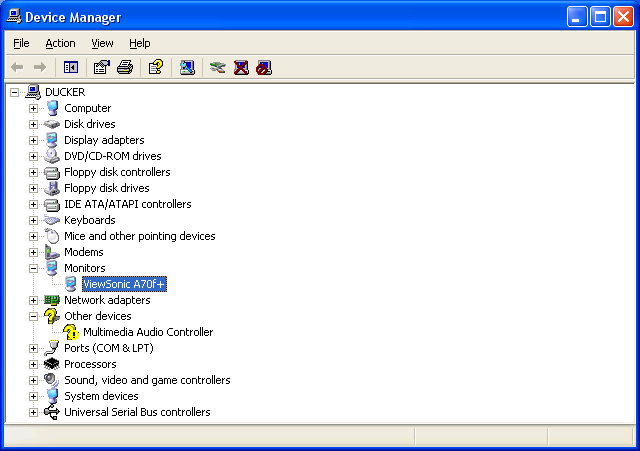
We now examine Device Manager again
and it lists the monitor as a ViewSonic A70f+ (Figure 155).
This means the correct monitor is identified. If we right click on the
monitor in Device Manager, we bring up its properties dialog box.
Figure 155: ViewSonic monitor now recognized After downloading and running the proper driver installer from ViewSonic, the correct monitor is identified.
|
| If you find The PC Guide useful, please consider making a small Paypal donation to help the site, using one of the buttons below. You can also donate a custom amount using the far right button (not less than $1 please, or PayPal gets most/all of your money!) In lieu of a larger donation, you may wish to consider buying the inexpensive print version of How to Build Your Own PC, direct from the author. Thanks for your support! |
|
|
Home -
Table Of Contents - Contact Us
How to Build Your Own PC (http://www.PCGuide.com/byop/) on PCGuide.com
Version 1.0 - Version Date: May 4, 2005
Adapted with permission from a work created by Charlie Palmer.
PCGuide.com Version © Copyright 2005 Charles M. Kozierok. All Rights Reserved.
Not responsible for any loss resulting from the use of this site.
|


