| Want this info 'offline' for your PC build? Get the book! |
Click Here!
|
|
|
Finding and Opening the gedit Word Processor
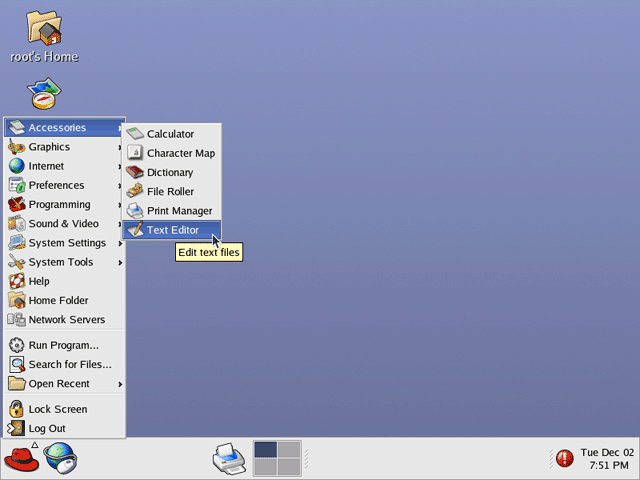
Navigate to the simple word processor
called gedit (Figure 196
and Figure 197).
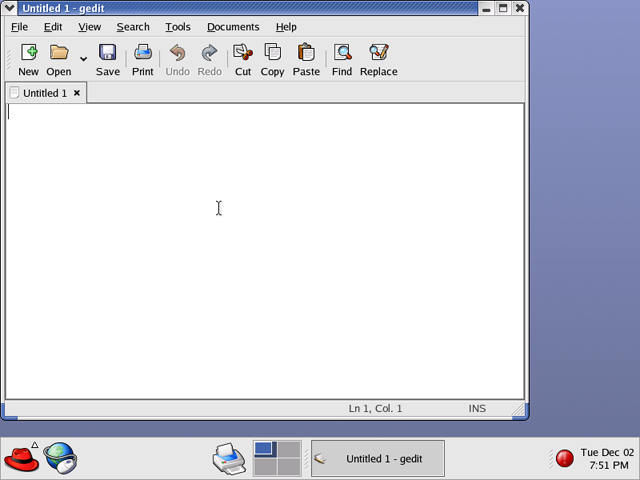
Gedit is handy for Linux shell scripting and for making changes to configuration
files.
Figure 196: Starting the gedit Text Editor Go to Accessories...Text Editor to bring up the Text Editor.
|
Figure 197: gedit Text Editor The gedit text editor. This program can be used to modify Linux configuration files or do shell scripting.
|
| If you find The PC Guide useful, please consider making a small Paypal donation to help the site, using one of the buttons below. You can also donate a custom amount using the far right button (not less than $1 please, or PayPal gets most/all of your money!) In lieu of a larger donation, you may wish to consider buying the inexpensive print version of How to Build Your Own PC, direct from the author. Thanks for your support! |
|
|
Home -
Table Of Contents - Contact Us
How to Build Your Own PC (http://www.PCGuide.com/byop/) on PCGuide.com
Version 1.0 - Version Date: May 4, 2005
Adapted with permission from a work created by Charlie Palmer.
PCGuide.com Version © Copyright 2005 Charles M. Kozierok. All Rights Reserved.
Not responsible for any loss resulting from the use of this site.
|


