| Get the entire How to Build Your Own PC in affordable hard copy |
Click Here!
|
|
|
Video Card
You’ll want to purchase an AGP
video card, which is better than a PCI video card. Be sure your mainboard
has an AGP slot for an AGP video card. The video card will have a connector
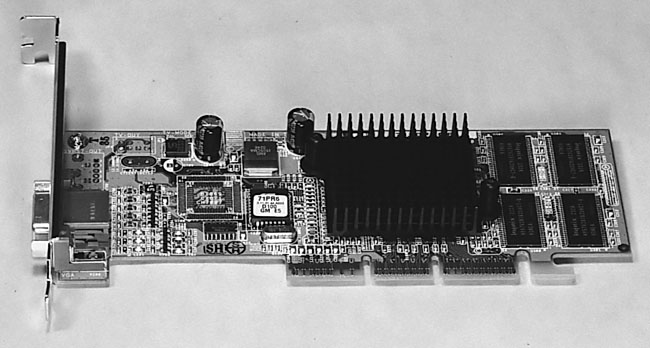
into which you’ll plug your monitor (see Figure 19).
The video connector will be visible
from the back of the PC. Most video monitors use the older analog connector
that is common with CRT computer monitors.
Figure 19: AGP video card Notice the black blob of spikes. That’s a heatsink to help draw heat away from the card. Some video cards will have their own fan which gets power from the AGP slot. You can identify AGP cards because the back of the card has a little notch to help secure it.
|
Newer video cards often
have two monitor connectors—one for use with CRT monitors and the
other a digital connector for use with LCD monitors. While many LCD
monitors support the older analog connection, if you plan to use an
LCD monitor, it’s best to choose a video card with a digital connector.
I’d recommend avoiding mainboards
with built-in video connectors. It’s better to use a video card.
| If you find The PC Guide useful, please consider making a small Paypal donation to help the site, using one of the buttons below. You can also donate a custom amount using the far right button (not less than $1 please, or PayPal gets most/all of your money!) In lieu of a larger donation, you may wish to consider buying the inexpensive print version of How to Build Your Own PC, direct from the author. Thanks for your support! |
|
|
Home -
Table Of Contents - Contact Us
How to Build Your Own PC (http://www.PCGuide.com/byop/) on PCGuide.com
Version 1.0 - Version Date: May 4, 2005
Adapted with permission from a work created by Charlie Palmer.
PCGuide.com Version © Copyright 2005 Charles M. Kozierok. All Rights Reserved.
Not responsible for any loss resulting from the use of this site.
|


