| Get How to Build Your Own PC in print for just $21.95 |
Click Here!
|
|
|
Hard Disk Drive
The hard drive is like long-term
human memory. Whatever’s saved on the hard drive will remain after
the computer is turned off.
The main factor in selecting a hard
drive is its size, which is measured in gigabytes. Today, you’ll
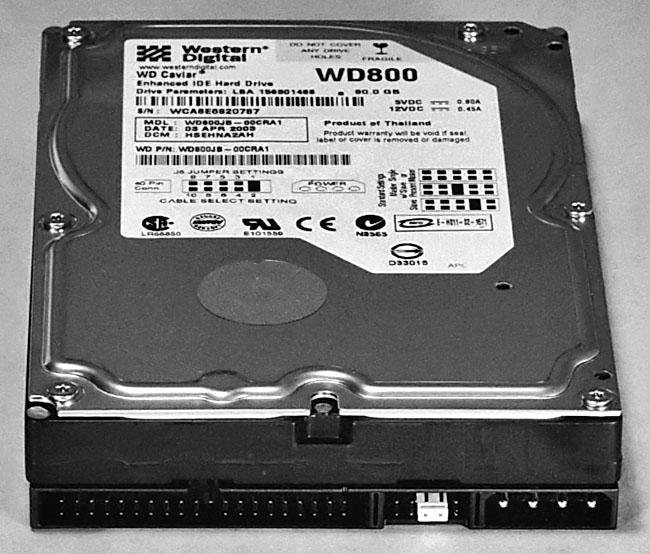
probably want at least a 40 GB drive. For this build, an 80 GB Western
Digital hard drive was purchased from Best Buy for $60. It is shown
in Figure 20.
A hard drive has platters which spin
around (think of how a CD works). The faster the platter spins, the
faster the hard drive can find, read, and write information. The speed
of a hard drive is usually measured in RPM or revolutions per minute.
Figure 20: Hard Disk Drive A ribbon cable will plug into the back of the hard drive (left side) to send signals between the drive and the mainboard. A 4-pin Molex power connector from the PC case’s power supply will provide power to the hard drive (right side). Usually four screws provided with the drive will attach the hard drive to the PC case.
|
The drive purchased for
the build spins at 7,200 RPM, which means the platter spins around 7,200
times every minute. That’s considered a good speed. If you’re
doing something that requires fast access from the hard drive, such
as playing videos, you’ll want the fastest drive you can afford.
The final hard drive performance
factor you’ll want to examine is the buffer size, which is usually
measured in Megabytes (MB), with 2 MB to 4 MB being common. This western
digital drive has an 8 MB buffer.
Buffers are like waiting areas where
information can be accessed more quickly than if the information must
be read from the hard drive.
The drives you’ll use are referred
to as IDE drives. Another type of drive, SCSI hard drives, are also
available. A new builder should stick with IDE drives.
Some people suggest purchasing the
largest drive you can afford because you’ll fill it up, especially
if you download many webpages, photos, videos, or songs. However, if
you don’t intensively download from the Internet, a more modest-sized
drive will probably work great.
| If you find The PC Guide useful, please consider making a small Paypal donation to help the site, using one of the buttons below. You can also donate a custom amount using the far right button (not less than $1 please, or PayPal gets most/all of your money!) In lieu of a larger donation, you may wish to consider buying the inexpensive print version of How to Build Your Own PC, direct from the author. Thanks for your support! |
|
|
Home -
Table Of Contents - Contact Us
How to Build Your Own PC (http://www.PCGuide.com/byop/) on PCGuide.com
Version 1.0 - Version Date: May 4, 2005
Adapted with permission from a work created by Charlie Palmer.
PCGuide.com Version © Copyright 2005 Charles M. Kozierok. All Rights Reserved.
Not responsible for any loss resulting from the use of this site.
|


