| Get the entire How to Build Your Own PC in affordable hard copy |
Click Here!
|
|
|
Using a Case from an Existing System
If you disassemble an existing system,
you might want to make yourself a drawing showing how things were connected,
so you’ll be able to reconnect them exactly the same way.
Many builders purchase a new notebook
and they keep a diary of their build, recording the steps they take,
the components used, and the settings. This helps knowing what was done
to the PC and the components and how things were connected. For example,
how is the jumper set on your hard drive?
One side of your case will contain
an inner panel to which you’ll attach the mainboard with standoffs
and a couple of screws (see Figure 12).
The panel is predrilled and the drilling patterns for an ATX and an
AT mainboard differ.
The standoffs and screws will come
with the case. The drilling patterns for an ATX case are designed to
match up with any ATX mainboard. That’s the theory, anyway.
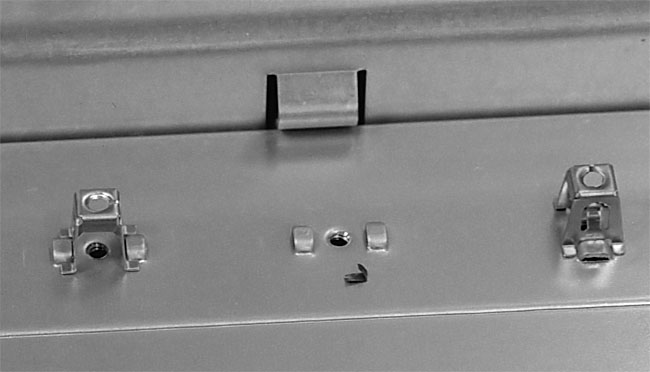
Figure 12: Standoffs inside the case These standoffs hold the bottom of the mainboard above the case. Each standoff (whether plastic or metal) should line up with a hole in the mainboard.
|
| If you find The PC Guide useful, please consider making a small Paypal donation to help the site, using one of the buttons below. You can also donate a custom amount using the far right button (not less than $1 please, or PayPal gets most/all of your money!) In lieu of a larger donation, you may wish to consider buying the inexpensive print version of How to Build Your Own PC, direct from the author. Thanks for your support! |
|
|
Home -
Table Of Contents - Contact Us
How to Build Your Own PC (http://www.PCGuide.com/byop/) on PCGuide.com
Version 1.0 - Version Date: May 4, 2005
Adapted with permission from a work created by Charlie Palmer.
PCGuide.com Version © Copyright 2005 Charles M. Kozierok. All Rights Reserved.
Not responsible for any loss resulting from the use of this site.
|


