| Read up on building your PC, anywhere you go! |
Click Here!
|
|
|
Updating Windows XP
First, after installing a modem and
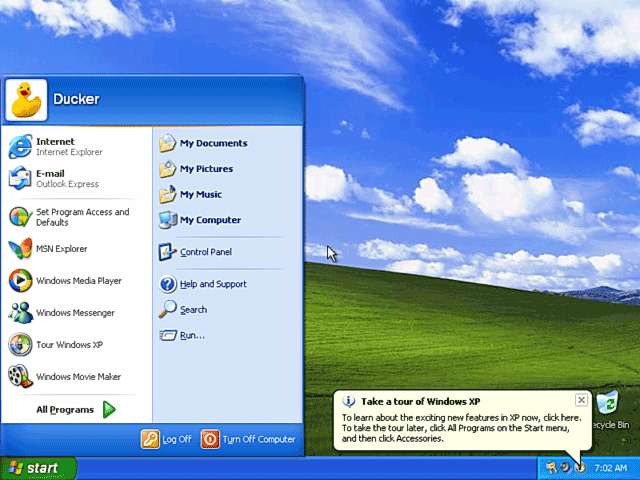
getting your modem connection working, log in and then click the “Start”
button to open the Start Menu (Figure 151).
Then find “Windows Update.” You may be familiar with Windows
Update already. Basically, you go online; Microsoft scans your system;
and then Microsoft installs any improvements it’s made to your
operating system since your last operating system update.
Figure 151: Logging in and opening the Start Menu Hitting the start menu brings up the menu of options. Go to “Control Panel” to get to Device Manager. Note: First, we’ll get the proper monitor recognized. But, if you want to change the desktop later, right click on the desktop and select “Properties.”
|
For us, Windows update
finds 29 MB of critical system and security updates. Go get another
Pepsi or coffee as it downloads and installs your updates.
It’s a good idea to run Windows
update regularly and install any critical updates, because malicious
hackers find new ways to infiltrate and attack Windows. Microsoft usually
then finds a defense which is made available via a software “patch.”
Not regularly updating your Windows operating system could leave your
computer vulnerable to attack.
Similarly, you should regularly update
your antivirus software so that it can recognize new viruses and protect
your computer from them. You should purchase an antivirus program for
your PC. I like Norton AntiVirus. You should also purchase a firewall,
such as Zone Alarm. XP has a built-in firewall, but I like Zone Alarm
better. Finally, you should go to download.com and get a free program
such as Spybot Search and Destroy, which removes spyware from your system.
| If you find The PC Guide useful, please consider making a small Paypal donation to help the site, using one of the buttons below. You can also donate a custom amount using the far right button (not less than $1 please, or PayPal gets most/all of your money!) In lieu of a larger donation, you may wish to consider buying the inexpensive print version of How to Build Your Own PC, direct from the author. Thanks for your support! |
|
|
Home -
Table Of Contents - Contact Us
How to Build Your Own PC (http://www.PCGuide.com/byop/) on PCGuide.com
Version 1.0 - Version Date: May 4, 2005
Adapted with permission from a work created by Charlie Palmer.
PCGuide.com Version © Copyright 2005 Charles M. Kozierok. All Rights Reserved.
Not responsible for any loss resulting from the use of this site.
|


