| Want this info 'offline' for your PC build? Get the book! |
Click Here!
|
|
|
Updating Drivers
If we hadn’t already run the
CD that came with the mainboard to install all the drivers for onboard
devices, we could proceed as follows to install the Ethernet driver.
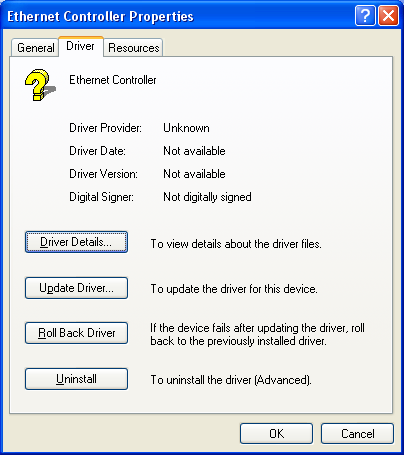
Hit “Update Driver” (Figure 159).
Figure 159: Ethernet Controller Properties Right clicking on the Ethernet Controller in Device Manager is another way to change the network driver. If some piece of hardware isn’t working, ask if the device needs a driver and see if the proper driver is installed.
|
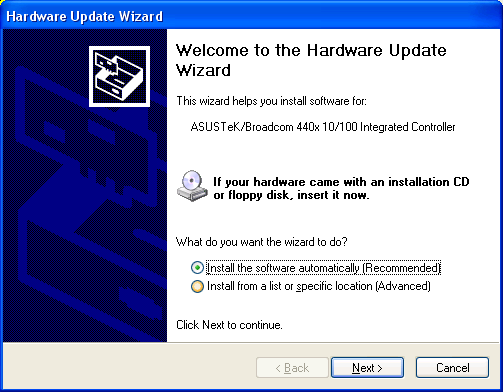
We’re taken to a “Hardware
Update Wizard” screen (Figure 160),
which allows us to install the driver software. We’re told to insert
the CD that came with the hardware. In this case, the network adapter
is part of the mainboard, so we insert the CD that came with the mainboard.
Figure 160: Hardware Update Wizard Selecting “Update Driver” brings up the hardware update wizard.
|
If we insert the mainboard
CD now, the system appears to hang. So, we hit Ctrl+Alt+Delete and receive
a message that the Hardware Wizard program isn’t responding. That
confirms our hunch that the Wizard wasn’t working. We close the
non-responsive program.
Trying again, we select “Install
from a list or specific location” (Figure 160).
Then, we select the CD as the removable drive to search for a new driver.
You might think that these two approaches should lead to the same result,
either failure to install or success. It doesn’t turn out that
way, however! The Wizard now runs and properly finds the driver! Examining
Device Manager, we see the proper network adapter is recognized, as
in Figure 158.
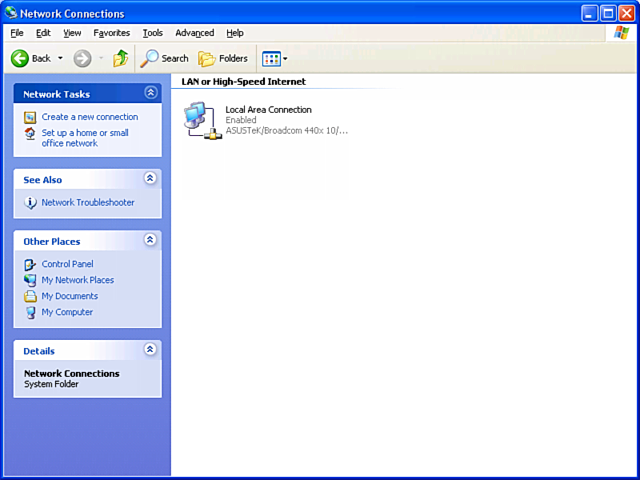
If we look under “Network Connections”
(Figure 161),
we see that the Local Area Network (LAN) is enabled. And, our new system
can connect to other systems in our house (We have a network hub and
cables installed already).
Figure 161: Network Connections (under Control Panel)
|
| If you find The PC Guide useful, please consider making a small Paypal donation to help the site, using one of the buttons below. You can also donate a custom amount using the far right button (not less than $1 please, or PayPal gets most/all of your money!) In lieu of a larger donation, you may wish to consider buying the inexpensive print version of How to Build Your Own PC, direct from the author. Thanks for your support! |
|
|
Home -
Table Of Contents - Contact Us
How to Build Your Own PC (http://www.PCGuide.com/byop/) on PCGuide.com
Version 1.0 - Version Date: May 4, 2005
Adapted with permission from a work created by Charlie Palmer.
PCGuide.com Version © Copyright 2005 Charles M. Kozierok. All Rights Reserved.
Not responsible for any loss resulting from the use of this site.
|


