| Get the entire How to Build Your Own PC in affordable hard copy |
Click Here!
|
|
|
Setting the BIOS to Check the CD Drive When Booting
The Western Digital hard drive has
not been partitioned or formatted and has no software on it.
When you start your system for the
first time, you’ll probably receive a message that the computer
couldn’t find a bootable disk or an operating system (unless you
already put the Windows CD in the CD tray).
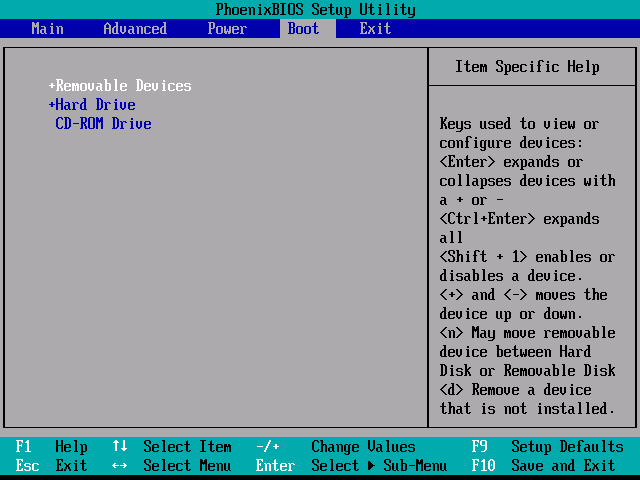
Your computer’s BIOS specifies
the search order that your computer uses to find a bootable operating
system (Figure 132).
This system seeks an operating system first from the floppy drive, second
from the hard drive, and third from a CD. You can enter BIOS to change
it so that the CD drive is checked before the hard drive, if you find
that desirable.
Figure 132: BIOS settings showing the system boot order Here the system tries to boot from the hard drive before the CD drive. Use arrow keys and plus/minus keys to switch the boot order if desired.
|
Because there wasn’t
a floppy disk in the floppy drive, no operating system was found there.
Then, the computer examined the hard drive, which is brand new, and
it didn’t find an operating system. Then, the computer examined
the CD drive and found no operating system, because there was no CD
in the tray. The result is that no operating system can be found.
| If you find The PC Guide useful, please consider making a small Paypal donation to help the site, using one of the buttons below. You can also donate a custom amount using the far right button (not less than $1 please, or PayPal gets most/all of your money!) In lieu of a larger donation, you may wish to consider buying the inexpensive print version of How to Build Your Own PC, direct from the author. Thanks for your support! |
|
|
Home -
Table Of Contents - Contact Us
How to Build Your Own PC (http://www.PCGuide.com/byop/) on PCGuide.com
Version 1.0 - Version Date: May 4, 2005
Adapted with permission from a work created by Charlie Palmer.
PCGuide.com Version © Copyright 2005 Charles M. Kozierok. All Rights Reserved.
Not responsible for any loss resulting from the use of this site.
|


