| Get How to Build Your Own PC in print for just $21.95 |
Click Here!
|
|
|
Booting the Windows XP CD – Initial Setup Screen
We’ll open the CD drive, insert
the Windows XP CD, close the drive, give the drive a moment to get up
to speed, and push the reset button to restart the system. (As a general
rule, try Alt+Ctrl+Delete to restart the system. If that doesn’t
work, use the reset switch. Alt+Ctrl+Delete is a Windows or DOS operating
system command, and a new system without an operating system won’t
recognize it). Try not to use the on-off button to restart your system,
because this is harder on the components.
Today, most mainboards support booting
from the CD. And, most OEM software also supports booting from the CD.
Installing an operating system is as easy as inserting the Windows CD
and restarting the system. If your system doesn’t support booting
from CD, you’ll need to make a bootable floppy disk on another
machine and use that to boot the new system.
With Windows XP, installing the operating
system from the OEM CD is a snap. Upon restarting with the Windows XP
CD in the drive, you’re immediately taken through a series of introductory
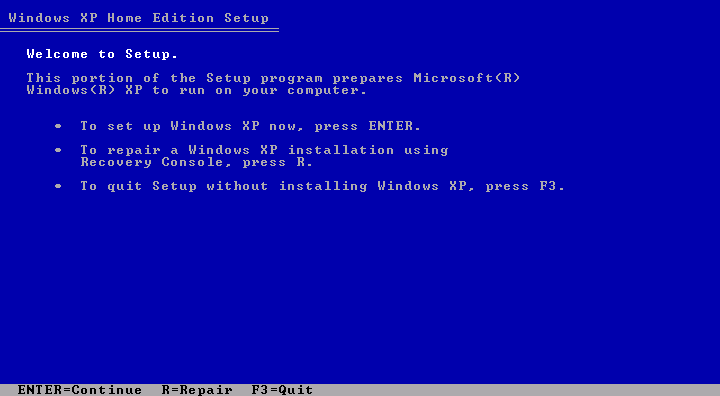
screens. First, a “Welcome” screen lets you know your PC sees
the Windows CD (Figure 133).
You’re all set to install Windows. Press “Enter” or “Next”
to continue whenever that’s the only option! However, if other
options exist, take a moment to consider them before accepting the defaults.
Figure 133: Microsoft welcomes you to setup Press ENTER to setup Windows on a new hard drive.
|
| If you find The PC Guide useful, please consider making a small Paypal donation to help the site, using one of the buttons below. You can also donate a custom amount using the far right button (not less than $1 please, or PayPal gets most/all of your money!) In lieu of a larger donation, you may wish to consider buying the inexpensive print version of How to Build Your Own PC, direct from the author. Thanks for your support! |
|
|
Home -
Table Of Contents - Contact Us
How to Build Your Own PC (http://www.PCGuide.com/byop/) on PCGuide.com
Version 1.0 - Version Date: May 4, 2005
Adapted with permission from a work created by Charlie Palmer.
PCGuide.com Version © Copyright 2005 Charles M. Kozierok. All Rights Reserved.
Not responsible for any loss resulting from the use of this site.
|


