| Want this info 'offline' for your PC build? Get the book! |
Click Here!
|
|
|
Preparing to Test the System
For the Enlight case, the side of
the case should be replaced before the front bezel is replaced. However,
we wish to see that the CPU fan is turning rapidly, so we’ll leave
the side of the case off for now. We will replace the front of the bezel,
although we could just as easily push the start/stop button with the
bezel off. The front cover is purely decorative. If in doubt which button
is for on-off and which is the reset, you could just hold up the bezel
and see which button is which.
There is ongoing debate about whether
or not you should run a system with its internals exposed. Some say
that modern cases are designed for effective cooling, sucking the air
in from one side of the case and blowing it out the other side. They
say that with the side removed, the proper sucking and blowing airflow
isn’t maintained and the system can overheat.
The other group says that, with the
side of the case off, there is great air circulation between the inside
of the case and the outside, and that’s about the best ambient
temperature you’ll ever get inside the case anyway, and so its
fine. (If you have a program to measure CPU and mainboard temperature,
you can test this to see which is cooler. See Figure 4.7) We’ll
compromise and lay the removed side panel of the case up against the
exposed side of the case. It’s generally agreed if the PC has a
hard drive smaller than 20 GB, the case should be fully covered to protect
the PC from embarrassment.
Now, we plug in the monitor to the
back of the video adapter card. We plug in the power cord to the back
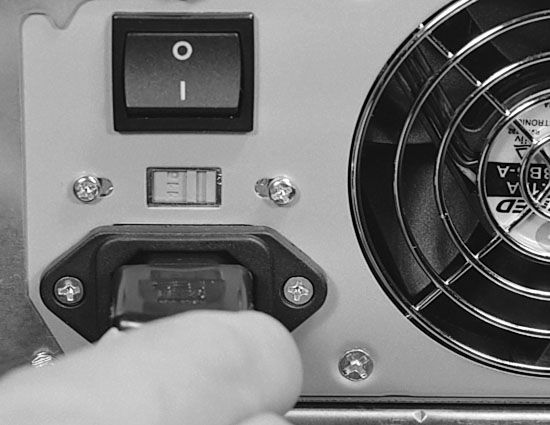
of the case (Figure 127).
And, we plug in the monitor to give it power.
It’s recommended that you not
plug your computer and monitor directly to a wall outlet. Rather, you
should purchase a UPS (uninterruptible power supply). The UPS serves
as a surge protector to prevent your system from being damaged if a
power spike is delivered to it. And, sometimes power will fail unexpectedly.
The UPS gives you time to save your work and properly shut down your
system.
Figure 127: Plugging in the power cord to the back of the case Above it is the ATX power supply on-off switch. Between the cord plug-in and the power switch is a selector for setting the incoming voltage. For the U.S., it should already be set to 115 volts when purchased.
|
If a system is turned off
and back on rapidly, it’s probably not good for the system. A very
short power drop could mimic this effect and could be hard on both the
computer and the monitor. A UPS prevents this.
| If you find The PC Guide useful, please consider making a small Paypal donation to help the site, using one of the buttons below. You can also donate a custom amount using the far right button (not less than $1 please, or PayPal gets most/all of your money!) In lieu of a larger donation, you may wish to consider buying the inexpensive print version of How to Build Your Own PC, direct from the author. Thanks for your support! |
|
|
Home -
Table Of Contents - Contact Us
How to Build Your Own PC (http://www.PCGuide.com/byop/) on PCGuide.com
Version 1.0 - Version Date: May 4, 2005
Adapted with permission from a work created by Charlie Palmer.
PCGuide.com Version © Copyright 2005 Charles M. Kozierok. All Rights Reserved.
Not responsible for any loss resulting from the use of this site.
|


