| Read up on building your PC, anywhere you go! |
Click Here!
|
|
|
Preparing to Install the RAM
RAM is very sensitive to static
electricity. Before picking up a RAM chip, touch both hands to a metal
piece to draw any static electricity away from your hands. You might
also want to wear a grounding wrist strap when you install the memory.
Try to touch the RAM only on its two sides and the top near the sides
(see Figure 5).
The sides are great for picking it up, but you’ll need to push
it into its socket from the top. Try not to touch the chips themselves
or the metal contacts. And, leave the RAM in its original packaging
until you’re ready to install it.
Not touching the metal leads of the
memory is also important because oils that build up on your hands can
damage the leads.
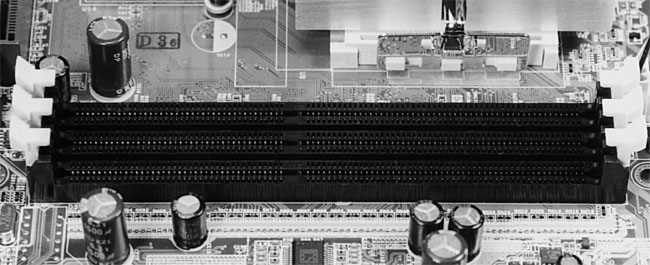
Examine the RAM sockets (Figure 38)
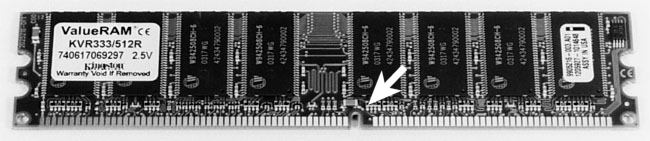
and the RAM chip (Figure 39).
You’ll see that RAM can only be inserted in one direction, because
there’s a small cut out separating the metal contacts (also called
leads) on the RAM chip into two sides. Each side has a different number
of metal contacts, making it impossible to seat the RAM chip incorrectly.
Be sure the notch in the RAM chip is aligned with the protruding part
on the RAM socket.
Figure 38: RAM slots (or sockets) on mainboard
|
Figure 39: RAM module notch The RAM chip has a notch (indicated by the white arrow) to prevent inserting it in the wrong orientation.
|
| If you find The PC Guide useful, please consider making a small Paypal donation to help the site, using one of the buttons below. You can also donate a custom amount using the far right button (not less than $1 please, or PayPal gets most/all of your money!) In lieu of a larger donation, you may wish to consider buying the inexpensive print version of How to Build Your Own PC, direct from the author. Thanks for your support! |
|
|
Home -
Table Of Contents - Contact Us
How to Build Your Own PC (http://www.PCGuide.com/byop/) on PCGuide.com
Version 1.0 - Version Date: May 4, 2005
Adapted with permission from a work created by Charlie Palmer.
PCGuide.com Version © Copyright 2005 Charles M. Kozierok. All Rights Reserved.
Not responsible for any loss resulting from the use of this site.
|


