| Get the entire How to Build Your Own PC in affordable hard copy |
Click Here!
|
|
|
Inserting the RAM Chips
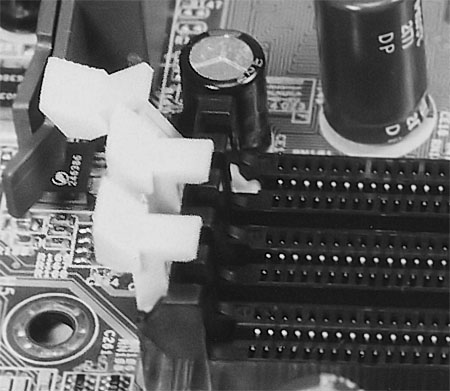
Fully open the locking levers of
the RAM socket (Figure 40).
Each bank will have a lever at each side. Push the lever gently away
from the RAM socket and down until it is fully open.
Figure 40: Opening the lever at the sides of the memory slot Pushing the chip down will close the lever.
|
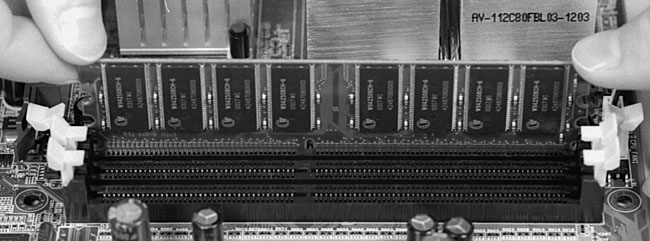
Now, pick up the RAM chip
and place it over the RAM socket. Be sure that it’s aligned in
the proper direction (see Figure 41).
Press the chip straight down into the socket. If it sticks, you might
find it useful to allow one side of the RAM chip to enter first, but
try to keep the chip as nearly level as possible as you push it into
place.
Figure 41: Inserting the memory chip into its slot Align the chip and press straight down. Be sure to touch the metal of the PC power supply before picking up the chip to draw off any static electricity that may have built up on your hands.
|
| If you find The PC Guide useful, please consider making a small Paypal donation to help the site, using one of the buttons below. You can also donate a custom amount using the far right button (not less than $1 please, or PayPal gets most/all of your money!) In lieu of a larger donation, you may wish to consider buying the inexpensive print version of How to Build Your Own PC, direct from the author. Thanks for your support! |
|
|
Home -
Table Of Contents - Contact Us
How to Build Your Own PC (http://www.PCGuide.com/byop/) on PCGuide.com
Version 1.0 - Version Date: May 4, 2005
Adapted with permission from a work created by Charlie Palmer.
PCGuide.com Version © Copyright 2005 Charles M. Kozierok. All Rights Reserved.
Not responsible for any loss resulting from the use of this site.
|


