| Get How to Build Your Own PC in print for just $21.95 |
Click Here!
|
|
|
Installing the New I/O Shield
Now we’ll put the new I/O shield
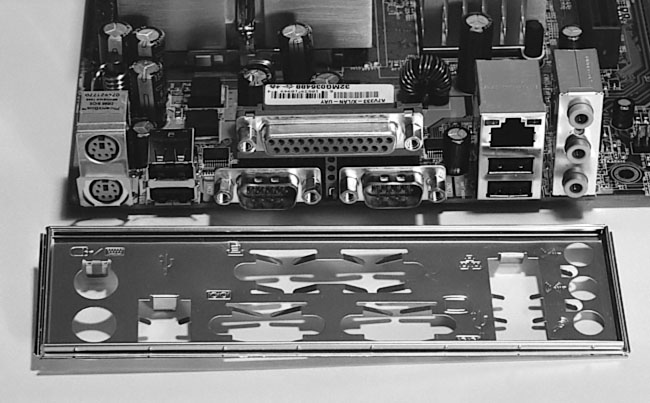
in place. First we will orient it as shown in Figure 61.
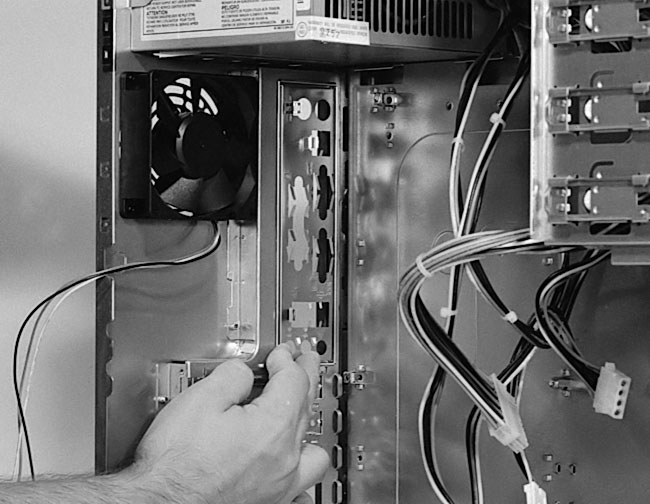
Then, since this new shield is the conventional style, we’ll pop
it into place from inside the case (Figure 62).
After installing the I/O shield from the inside of the case, we could
use the back of a screwdriver to push the I/O shield into place. Some
I/O shields have very sharp edges, so be careful not to allow your hand
to slip and hit the shield or the case when you’re removing or
installing an I/O shield. Remember, blood spurting out of your finger
will detract from the fun of building your own PC.
Figure 61: Orienting the I/O shield The corner of the mainboard must sit toward the top of the case (see Figure 58 to get an idea of where the mainboard sits). Thus, the new I/O shield must be installed so that the two big holes on the left (for the keyboard and mouse) are toward the top of the case. The three connectors to the right are for the mainboard’s built-in sound.
|
Figure 62: Popping the new I/O shield into place Note: The orientation of the shield is determined by the mainboard. The metal fins of the shield point inward. Writing on the shield to identify the connectors is on the outside.
|
The preceding figures show
us that the orientation of the I/O shield is important. Typically, the
PS/2 connectors for the keyboard and the mouse will sit toward the top
of the case.
| If you find The PC Guide useful, please consider making a small Paypal donation to help the site, using one of the buttons below. You can also donate a custom amount using the far right button (not less than $1 please, or PayPal gets most/all of your money!) In lieu of a larger donation, you may wish to consider buying the inexpensive print version of How to Build Your Own PC, direct from the author. Thanks for your support! |
|
|
Home -
Table Of Contents - Contact Us
How to Build Your Own PC (http://www.PCGuide.com/byop/) on PCGuide.com
Version 1.0 - Version Date: May 4, 2005
Adapted with permission from a work created by Charlie Palmer.
PCGuide.com Version © Copyright 2005 Charles M. Kozierok. All Rights Reserved.
Not responsible for any loss resulting from the use of this site.
|


