| Read up on building your PC, anywhere you go! |
Click Here!
|
|
|
Connecting the Sound Cable (If Not Already Done)
If you haven’t already done
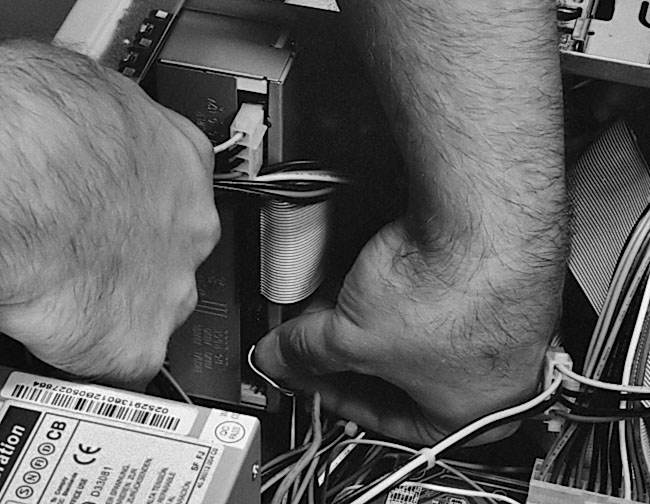
so, it’s a good time to connect the sound cable to your CD (Figure 113
and Figure 114)
and to your mainboard if it has built-in sound. If you’re using
a PCI sound card, you’ll need to install it before you can connect
the sound cable between it and the CD-RW.
Figure 113: Connecting the sound cable to the CD-RW drive The other end connects to a sound card or to the mainboard. See the discussion at the beginning of this chapter for more information. Here, the thumb is pushing the sound connector into place.
|
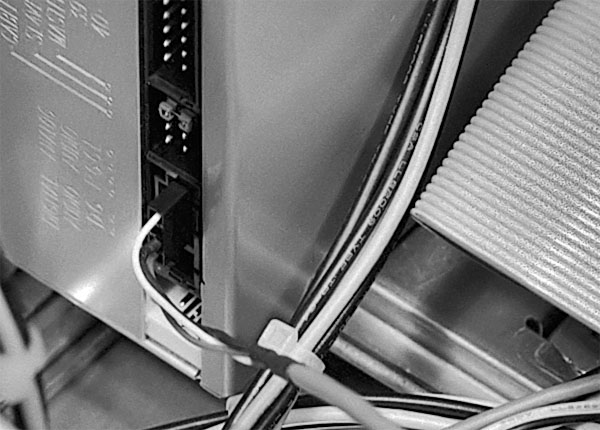
Figure 114: Close-up of sound cable connected to the CD-RW drive Notice that we’ve removed the ribbon cable for photo clarity. Also see Figure 88 and Figure 89.
|
| If you find The PC Guide useful, please consider making a small Paypal donation to help the site, using one of the buttons below. You can also donate a custom amount using the far right button (not less than $1 please, or PayPal gets most/all of your money!) In lieu of a larger donation, you may wish to consider buying the inexpensive print version of How to Build Your Own PC, direct from the author. Thanks for your support! |
|
|
Home -
Table Of Contents - Contact Us
How to Build Your Own PC (http://www.PCGuide.com/byop/) on PCGuide.com
Version 1.0 - Version Date: May 4, 2005
Adapted with permission from a work created by Charlie Palmer.
PCGuide.com Version © Copyright 2005 Charles M. Kozierok. All Rights Reserved.
Not responsible for any loss resulting from the use of this site.
|


