| Read up on building your PC, anywhere you go! |
Click Here!
|
|
|
Choosing and Installing Standoffs
Count the final number of standoffs
that you plan to use, and be sure that there is a screw hole in the
mainboard for each standoff used. Then, be sure each standoff is visible
through a screw hole. This will help you not to forget to remove a standoff
without a screw hole above it on the mainboard.
Some cases come with plastic standoffs
which are designed to be inserted into the mainboard first. Then, the
bottom end of the plastic standoff sits on the metal case.
The Enlight case comes with two different
types of standoffs. One style is designed with a screw hole in the top.
This allows the mainboard to be secured to the case with a screw. These
standoffs are also used for properly grounding the mainboard to the
case. Screwing down the mainboard to the standoff grounds the mainboard.
You’ll see a ring of metal around the mainboard hole. This ring
helps ground the mainboard to the case. Some experts suggest only using
plastic standoffs below mainboard holes that lack a ring of metal. A
variety of standoffs will usually come with your PC case.
The other style of standoff isn’t
designed to be screwed down. It just sits below the mainboard and provides
a resting surface for the mainboard. This case has two screw-down standoffs
already in good locations, and we’ll screw down the mainboard only
in those two locations.
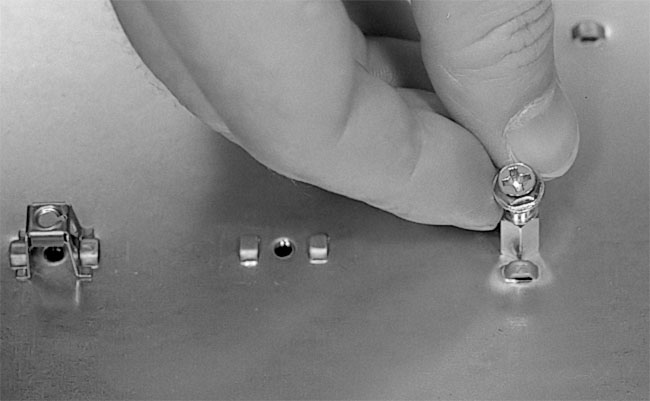
Be sure to test fit the screws that
come with your case to be sure that you’ve selected the correct
screws for securing the mainboard (Figure 67).
If you just start a screw with a screwdriver, it’s possible to
strip the socket or the screw threads. So before you seat the mainboard,
first test the screw with your hand to be sure it works. Then, have
the two proper screws (or more) handy when you place the mainboard.
Figure 67: Testing a screw in a standoff hole At least two standoffs will be designed so that the mainboard can be screwed down and secured.
|
| If you find The PC Guide useful, please consider making a small Paypal donation to help the site, using one of the buttons below. You can also donate a custom amount using the far right button (not less than $1 please, or PayPal gets most/all of your money!) In lieu of a larger donation, you may wish to consider buying the inexpensive print version of How to Build Your Own PC, direct from the author. Thanks for your support! |
|
|
Home -
Table Of Contents - Contact Us
How to Build Your Own PC (http://www.PCGuide.com/byop/) on PCGuide.com
Version 1.0 - Version Date: May 4, 2005
Adapted with permission from a work created by Charlie Palmer.
PCGuide.com Version © Copyright 2005 Charles M. Kozierok. All Rights Reserved.
Not responsible for any loss resulting from the use of this site.
|


