| Want this info 'offline' for your PC build? Get the book! |
Click Here!
|
|
|
Aligning Case Standoff Locations to Mainboard Holes
The mainboard should fit with no
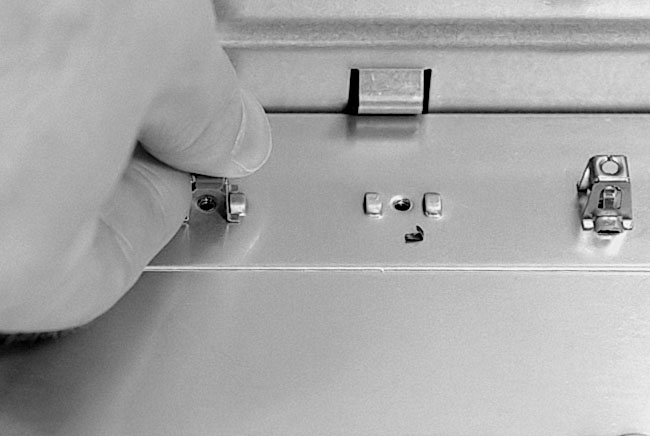
problem. We need to watch out for extra standoffs that don’t
line up with screw holes in the mainboard. Remove those standoffs
or they will touch the bottom of the mainboard in undesirable locations.
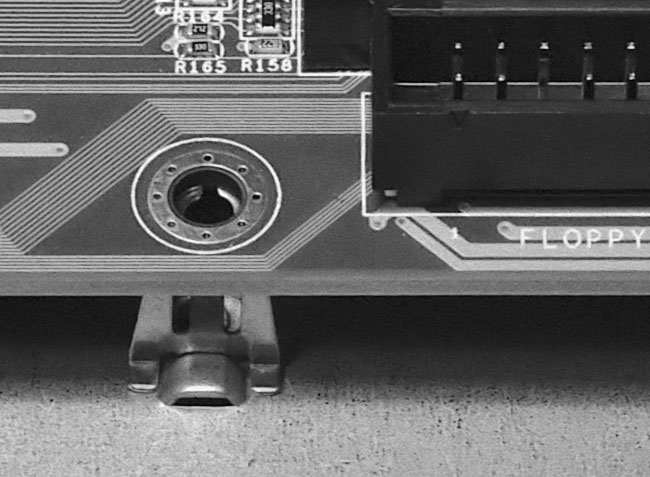
A standoff below a screw hole is acceptable (Figure 65
and Figure 66).
Figure 65: Aligning case standoffs and mainboard holes Every case standoff must line up with a hole in the mainboard. Remove any standoffs that don’t line up. This is important, because improperly placed standoffs could inappropriately ground parts of the mainboard.
|
Figure 66: Removing an offending standoff This standoff wouldn’t sit below a hole in the mainboard. When placing the board, always look for standoffs that don’t line up with holes.
|
We might also want to add
a few extra standoffs at other locations that match up with screw holes
in the mainboard. In particular, in this build, we needed to add standoffs
in the area around the sockets for the ATX power supply and the ribbon
cable sockets for the floppy and hard drives. These standoffs help reduce
stress to the mainboard when the ribbon and power cables are plugged
in. We don’t want the board to bend under the force of plugging
in a ribbon cable. Figure 65
shows a standoff near a ribbon socket.
| If you find The PC Guide useful, please consider making a small Paypal donation to help the site, using one of the buttons below. You can also donate a custom amount using the far right button (not less than $1 please, or PayPal gets most/all of your money!) In lieu of a larger donation, you may wish to consider buying the inexpensive print version of How to Build Your Own PC, direct from the author. Thanks for your support! |
|
|
Home -
Table Of Contents - Contact Us
How to Build Your Own PC (http://www.PCGuide.com/byop/) on PCGuide.com
Version 1.0 - Version Date: May 4, 2005
Adapted with permission from a work created by Charlie Palmer.
PCGuide.com Version © Copyright 2005 Charles M. Kozierok. All Rights Reserved.
Not responsible for any loss resulting from the use of this site.
|


