| Get the entire How to Build Your Own PC in affordable hard copy |
Click Here!
|
|
|
Tips for Safe Component Handling
There are three key points to handling
components safely.
First, be sure to draw off any static
electricity that may be built up on your hands before you touch a sensitive
part. You should touch the metal PC case before touching the components.
Metal will draw off any built-up charge. Even if you wear a grounding
wrist strap, touch the PC case anyway as an extra precaution. Touching
the case’s power supply is usually recommended, because some say
that touching a heavily painted case will sometimes fail to draw off
the charge. The power supply is unpainted metal that is always grounded.
Second, touch the parts where they’re
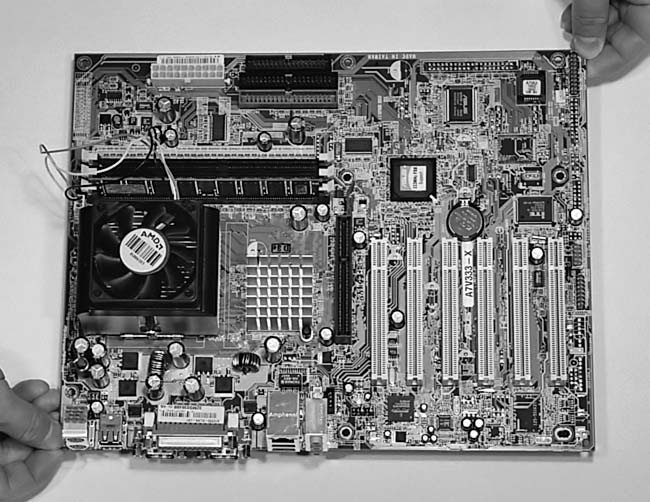
the least sensitive to being harmed by ESD. Pick up mainboards by the
edges (Figure 3).
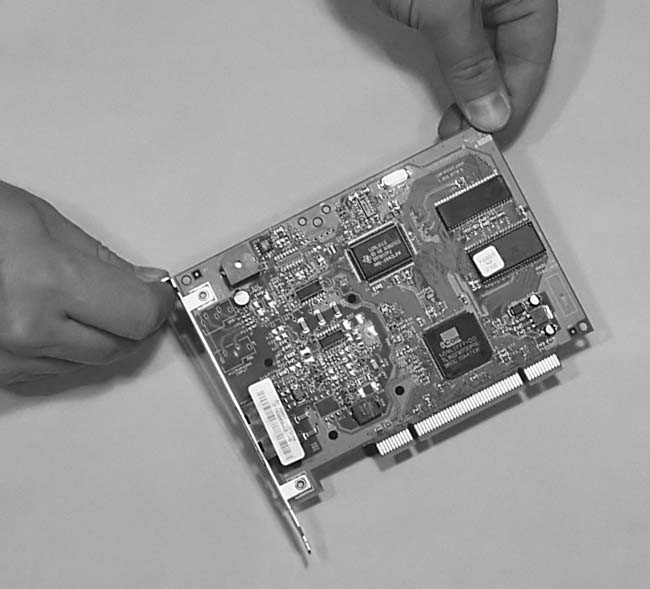
Pick up PCI cards by the metal part that attaches them to the back of
the case and then handle them by the edges (Figure 4).
Try to handle all sensitive parts by the edges.
Figure 3: Holding a mainboard properly, by the corners
|
Figure 4: Holding a PCI card properly, by the metal and the edges
|
| If you find The PC Guide useful, please consider making a small Paypal donation to help the site, using one of the buttons below. You can also donate a custom amount using the far right button (not less than $1 please, or PayPal gets most/all of your money!) In lieu of a larger donation, you may wish to consider buying the inexpensive print version of How to Build Your Own PC, direct from the author. Thanks for your support! |
|
|
Home -
Table Of Contents - Contact Us
How to Build Your Own PC (http://www.PCGuide.com/byop/) on PCGuide.com
Version 1.0 - Version Date: May 4, 2005
Adapted with permission from a work created by Charlie Palmer.
PCGuide.com Version © Copyright 2005 Charles M. Kozierok. All Rights Reserved.
Not responsible for any loss resulting from the use of this site.
|


