| Read up on building your PC, anywhere you go! |
Click Here!
|
|
|
Setting Up the Root Password
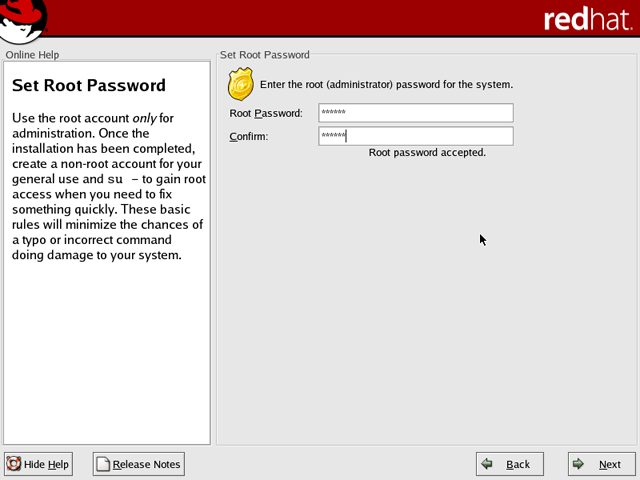
Next, you’ll be asked to choose
a password for “root” (Figure 177).
In Linux, root is the supreme commander of the operating system. Logging
in as “root” allows you to modify the operating system. As
a general rule, you should only log in as the root user when it’s
necessary for administrating your computer. For general Linux use, log
in as a normal user. That helps prevent you from inadvertently modifying
your system.
Figure 177: Selecting a password for “root” You’ll login as “root” when you wish to modify your Linux operating system.
|
You’ll have the opportunity
to create regular user accounts later. Be sure to write down or remember
your root password. You must enter it twice to confirm it.
As soon as you start typing, a message
that the passwords don’t match appears. Don’t let this throw
you. You haven’t had a chance to enter anything into the second
password box yet! Eventually, you’ll get those suckers to match!
Linux is case sensitive.
| If you find The PC Guide useful, please consider making a small Paypal donation to help the site, using one of the buttons below. You can also donate a custom amount using the far right button (not less than $1 please, or PayPal gets most/all of your money!) In lieu of a larger donation, you may wish to consider buying the inexpensive print version of How to Build Your Own PC, direct from the author. Thanks for your support! |
|
|
Home -
Table Of Contents - Contact Us
How to Build Your Own PC (http://www.PCGuide.com/byop/) on PCGuide.com
Version 1.0 - Version Date: May 4, 2005
Adapted with permission from a work created by Charlie Palmer.
PCGuide.com Version © Copyright 2005 Charles M. Kozierok. All Rights Reserved.
Not responsible for any loss resulting from the use of this site.
|


