| Want this info 'offline' for your PC build? Get the book! |
Click Here!
|
|
|
Other Case Connectors and Switches
Other connectors from the case don’t
supply power, but they connect the front panel of the computer case
to the mainboard. These connectors are thin wires with little connectors
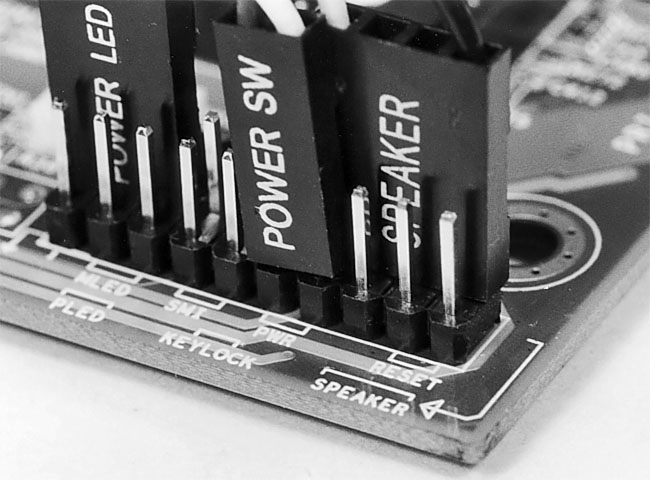
on the ends that plug into pins on the mainboard (Figure 10).
Figure 10: Thin-wire connectors connect the front of the PC case to the mainboard Even though these connectors can be plugged in backward, don’t fear, because doing so won’t harm your system. Try to get them onto the right pins on the mainboard.
|
For example, to turn the
computer on and off, there is an on-off switch on the case. The small
Power SW wire connects the power button on the case to the mainboard
to let the mainboard know when you want the PC to turn on or off. This
small two-pin connector may be plugged-in in either direction on the
mainboard.
Basic switches can usually be installed
in either direction, because they are designed to either open or close
a circuit. So, the orientation of the two pins doesn’t usually
matter.
Examine your mainboard manual
carefully to determine the proper pins to connect these thin-wire case
panel connectors to. Also examine your mainboard carefully before
installing it in the case, because you’ll often have a better view
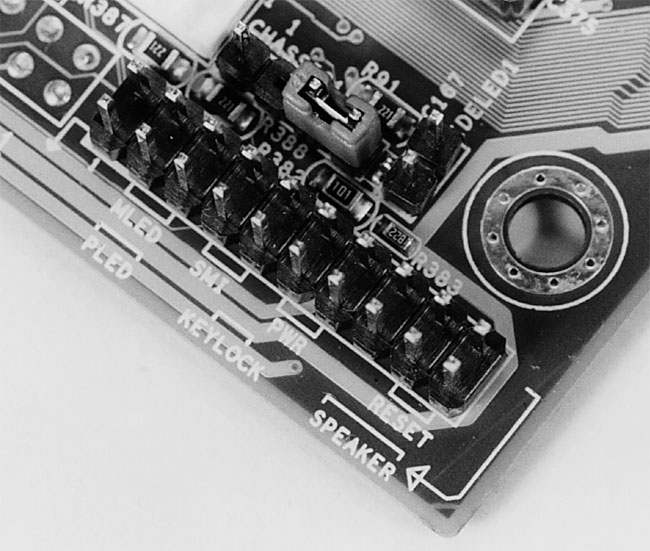
of the pins when the mainboard is out of the case. Usually, a row of
many pins will be provided on the mainboard (Figure 11).
It’s easy to plug the little fellers on the wrong pins if you don’t
pay attention to the mainboard manual.
Figure 11: Corner of the mainboard The thin-wire connectors from the case will connect here. It’s easy to plug them in wrong.
|
| If you find The PC Guide useful, please consider making a small Paypal donation to help the site, using one of the buttons below. You can also donate a custom amount using the far right button (not less than $1 please, or PayPal gets most/all of your money!) In lieu of a larger donation, you may wish to consider buying the inexpensive print version of How to Build Your Own PC, direct from the author. Thanks for your support! |
|
|
Home -
Table Of Contents - Contact Us
How to Build Your Own PC (http://www.PCGuide.com/byop/) on PCGuide.com
Version 1.0 - Version Date: May 4, 2005
Adapted with permission from a work created by Charlie Palmer.
PCGuide.com Version © Copyright 2005 Charles M. Kozierok. All Rights Reserved.
Not responsible for any loss resulting from the use of this site.
|


