| Read up on building your PC, anywhere you go! |
Click Here!
|
|
|
Opening the Case
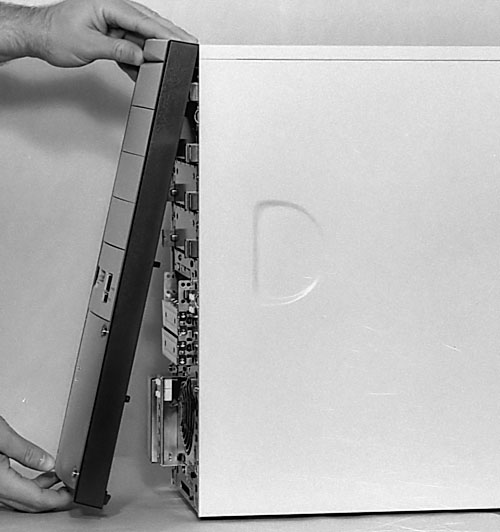
Figure 46
shows us removing the front panel of our Enlight case. There is a latch
below the front of the case which allows the front of the case to be
removed. Be sure to press the latch all the way so that it disengages
from the case. These latches are sometimes made of cheap plastic (or,
at least, it appears cheap to me), so don’t use any greater force
than necessary. With the latch pressed, pull the front cover away from
the rest of the case.
Figure 46: Removing the front cover of the PC case Your case may open differently. Inspect it carefully before deciding how to proceed. Although the case is pictured lying flat on the table, it sometimes helps to lift the front of the case a few inches off the table to be able to get a good grip on the latch.
|
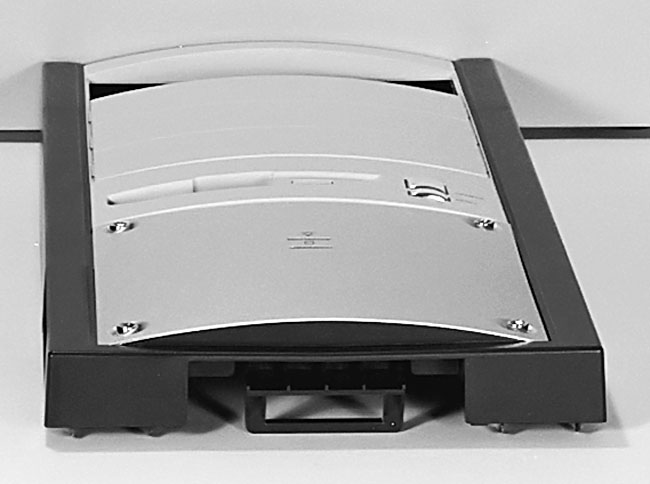
After the latch has been
disengaged from the case, the bezel pivots away at the top of the case.
Only pivot the bezel a bit and then try to pull the bezel straight out
and away from the case.
Figure 47: Bottom of the bezel Notice the latches and lugs on bezels are often made of plastic. Be gentle to avoid breaking a lug or latch.
|
| If you find The PC Guide useful, please consider making a small Paypal donation to help the site, using one of the buttons below. You can also donate a custom amount using the far right button (not less than $1 please, or PayPal gets most/all of your money!) In lieu of a larger donation, you may wish to consider buying the inexpensive print version of How to Build Your Own PC, direct from the author. Thanks for your support! |
|
|
Home -
Table Of Contents - Contact Us
How to Build Your Own PC (http://www.PCGuide.com/byop/) on PCGuide.com
Version 1.0 - Version Date: May 4, 2005
Adapted with permission from a work created by Charlie Palmer.
PCGuide.com Version © Copyright 2005 Charles M. Kozierok. All Rights Reserved.
Not responsible for any loss resulting from the use of this site.
|


