| Get the entire How to Build Your Own PC in affordable hard copy |
Click Here!
|
|
|
Modem
Today, modems and an Internet connection
are nearly essential. You have many options for modems and Internet
service providers ranging from DSL Internet connections, cable modems
and cable access to the Internet, slow 56k dial-up modems, and satellite
Internet connections. The modem and other equipment you need will depend
upon the type of Internet connection you decide to use. An example of
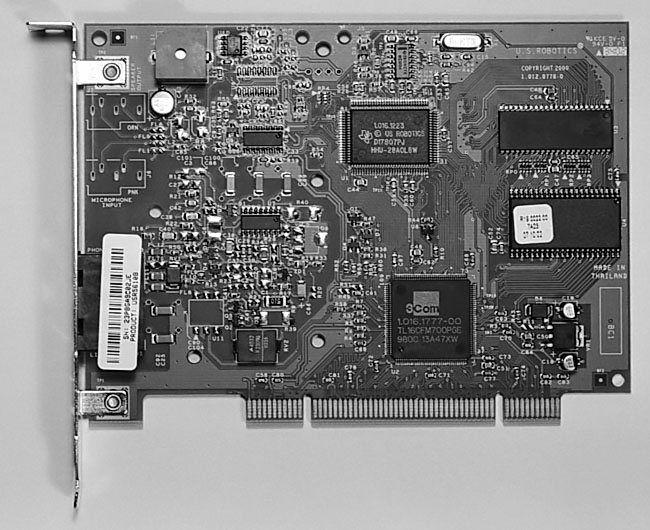
a PCI modem card can be found in Figure 23.
Figure 23: Modem card This is a PCI modem card. The most common type of expansion cards are PCI cards. They plug into PCI slots in the mainboard. All PCI cards are installed in the same manner. Once you’ve installed one, you’ve installed them all!
|
Many people today will
choose cable modems or DSL modems because of their much faster download
speed.
Modems can also be internal or external.
Internal modems usually plug into a PCI slot in your mainboard. Some
internal modems are called Win Modems, because they rely upon the mainboard’s
processing power to help them do their job. Win Modems are less expensive
and are affectionately known as lobotomized modems.
Unless you plan to do intensive computing
while also online, a Win Modem should be fine if you plan to use a Windows
operating system. If you plan to use Linux, you might want to avoid
Win Modems, because they’re sometimes more difficult to configure
properly with Linux. Non-Win-Modems are called controller-based modems.
I like external modems (all of which
are controller-based), because I like to see all the lights (LEDs) showing
modem activity. And, if the modem disconnects, a glance at the external
modem’s LEDs will show it’s disconnected.
Some operating systems are notorious
for showing a dial-up modem as connected even if the connection has
been lost. I also like to turn off the modem when it’s not in use.
That physically prevents a hacker from gaining access to your computer.
Some internal modems have lights
showing similar activity. These lights sit at the back end of the PC
where nobody can see them. I don’t know what genius decided that
modem lights on an internal modem was a good idea.
Most controller-based modems, whether
external or internal, should work with Linux.
| If you find The PC Guide useful, please consider making a small Paypal donation to help the site, using one of the buttons below. You can also donate a custom amount using the far right button (not less than $1 please, or PayPal gets most/all of your money!) In lieu of a larger donation, you may wish to consider buying the inexpensive print version of How to Build Your Own PC, direct from the author. Thanks for your support! |
|
|
Home -
Table Of Contents - Contact Us
How to Build Your Own PC (http://www.PCGuide.com/byop/) on PCGuide.com
Version 1.0 - Version Date: May 4, 2005
Adapted with permission from a work created by Charlie Palmer.
PCGuide.com Version © Copyright 2005 Charles M. Kozierok. All Rights Reserved.
Not responsible for any loss resulting from the use of this site.
|


