| Get the entire How to Build Your Own PC in affordable hard copy |
Click Here!
|
|
|
Installing the Hard Drive in the Drive Cage
Remove the 3.5" cage from the case,
if it isn’t removed already. While we could put the hard drive
immediately below the floppy, we’ll skip one bay and place it in
the last bay farthest away from the floppy. The extra air space between
drives should help with cooling.
Remove the RF shield; or, if the
drive sits far enough back, you could just leave the shield in place.
It shouldn’t matter. The drive itself will act as a shield. Insert
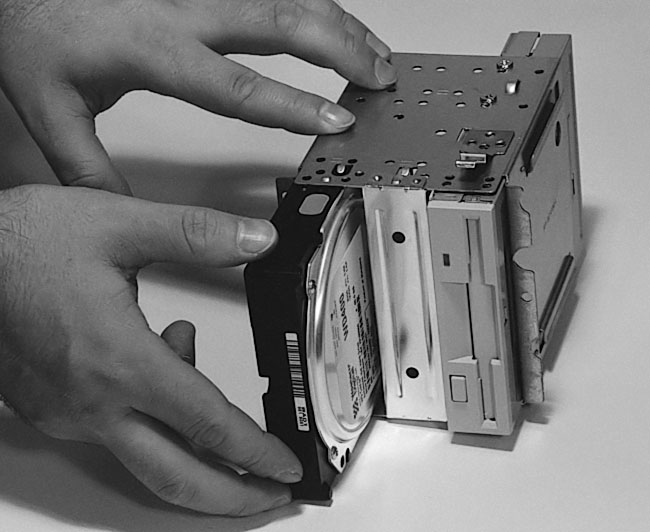
the drive into the cage (Figure 80).
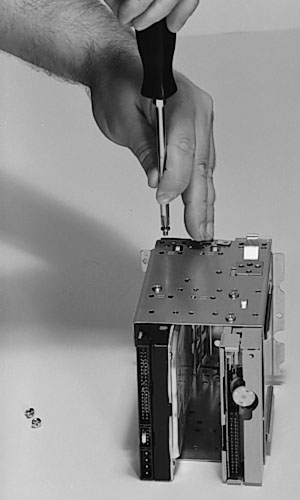
Then screw the drive to secure it to the 3.5” cage (Figure 81).
The back of the drive has connections for the ribbon cable and power
connector. Those should point to the inside of the case.
Figure 80: Inserting the hard drive into the 3.5” drive cage
|
Figure 81: Screwing the hard drive into the 3.5” drive cage Try to avoid touching the bottom of the hard drive which contains a circuit board. It’s also good to ground yourself before handling the hard drive.
|
As with the floppy, before
screwing in the hard drive, pick up a screw and test it by hand or with
very light pressure from the screwdriver. Find three similar screws.
It’s best to use screws that came with the hard drive.
| If you find The PC Guide useful, please consider making a small Paypal donation to help the site, using one of the buttons below. You can also donate a custom amount using the far right button (not less than $1 please, or PayPal gets most/all of your money!) In lieu of a larger donation, you may wish to consider buying the inexpensive print version of How to Build Your Own PC, direct from the author. Thanks for your support! |
|
|
Home -
Table Of Contents - Contact Us
How to Build Your Own PC (http://www.PCGuide.com/byop/) on PCGuide.com
Version 1.0 - Version Date: May 4, 2005
Adapted with permission from a work created by Charlie Palmer.
PCGuide.com Version © Copyright 2005 Charles M. Kozierok. All Rights Reserved.
Not responsible for any loss resulting from the use of this site.
|


