| Get the entire How to Build Your Own PC in affordable hard copy |
Click Here!
|
|
|
Installing the CD-RW Drive in the Drive Cage
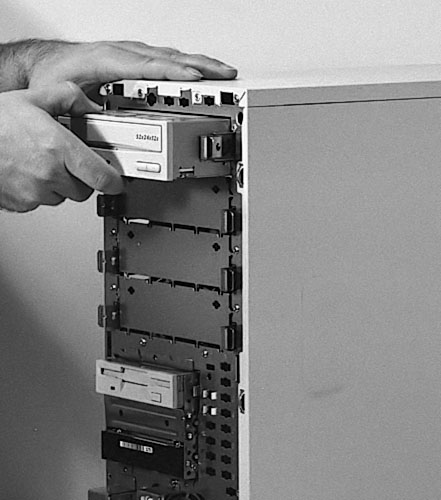
This Enlight case has a screwless
system for securing the 5.25" drives. We simply pull out the levers
on each side of the drive. Be sure the levers are all the way out. Then
we insert the drive and push it into place (Figure 85).
We then close the levers which lock the drive into place.
It’s possible to get this wrong.
For example, not locking the drive in fully. We’ll grab the drive
and tug it back and forth to be sure it’s fully secured. It is.
Little nipples come out to engage the screw holes in the drive and further
tightness is provided by the sides of the levers which push against
the drive.
Figure 85: Inserting the CD-RW drive into its bay This PC case uses a screwless system where the drive simply inserts and is secured by closing some levers. Your case may differ. Many PC cases use four screws on the side of the CD-RW to secure the drive to rails. Then the rails insert into slots in the case.
|
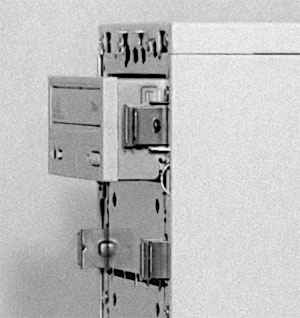
Notice that the front of
the drive will protrude slightly (Figure 86).
This is normal. When the front bezel is replaced, the front of the drive
will appear flush with the front of the case. It’s often necessary
to gently push the plastic of the bezel slightly up or down if it’s
hitting the face of the drive or to push the plastic of the drive just
up or down slightly. Don’t slam the bezel shut without checking
for minor obstructions to it closing.
Figure 86: CD-RW drive installed in case Notice that the drive protrudes from the front of the case. It will be flush with the front of the case when we replace the bezel.
|
| If you find The PC Guide useful, please consider making a small Paypal donation to help the site, using one of the buttons below. You can also donate a custom amount using the far right button (not less than $1 please, or PayPal gets most/all of your money!) In lieu of a larger donation, you may wish to consider buying the inexpensive print version of How to Build Your Own PC, direct from the author. Thanks for your support! |
|
|
Home -
Table Of Contents - Contact Us
How to Build Your Own PC (http://www.PCGuide.com/byop/) on PCGuide.com
Version 1.0 - Version Date: May 4, 2005
Adapted with permission from a work created by Charlie Palmer.
PCGuide.com Version © Copyright 2005 Charles M. Kozierok. All Rights Reserved.
Not responsible for any loss resulting from the use of this site.
|


