| Get the entire How to Build Your Own PC in affordable hard copy |
Click Here!
|
|
|
Dual Booting and Configuring Linux
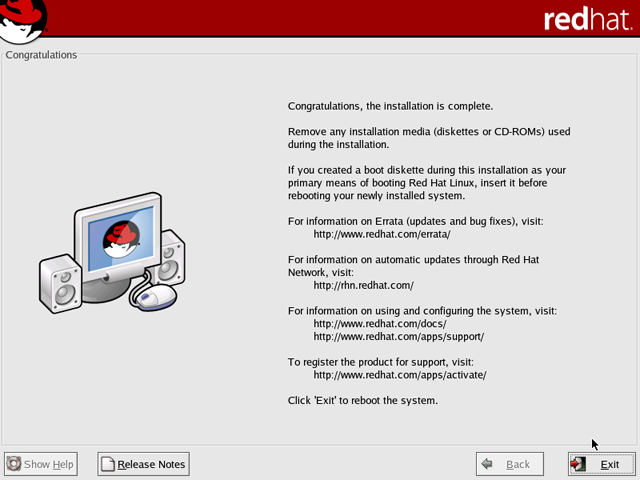
Now, we must restart the PC (Figure 185).
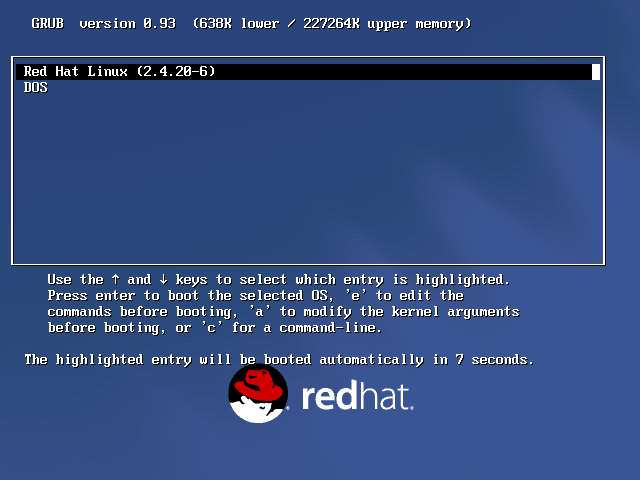
When we do, a dual boot screen will appear (Figure 186).
Use the arrow keys to select “Linux” as the operating system
you want to run and hit “Enter,” so that Linux will have a
chance to complete its installation.
Figure 185: Installation complete Click “Next.”
|
Figure 186: GRUB dual boot screen At startup, the bootloader offers you the choice between Windows XP (listed as DOS) and Red Hat Linux. The default is highlighted.
|
|
Quick navigation to subsections and regular topics in this section
|
| If you find The PC Guide useful, please consider making a small Paypal donation to help the site, using one of the buttons below. You can also donate a custom amount using the far right button (not less than $1 please, or PayPal gets most/all of your money!) In lieu of a larger donation, you may wish to consider buying the inexpensive print version of How to Build Your Own PC, direct from the author. Thanks for your support! |
|
|
Home -
Table Of Contents - Contact Us
How to Build Your Own PC (http://www.PCGuide.com/byop/) on PCGuide.com
Version 1.0 - Version Date: May 4, 2005
Adapted with permission from a work created by Charlie Palmer.
PCGuide.com Version © Copyright 2005 Charles M. Kozierok. All Rights Reserved.
Not responsible for any loss resulting from the use of this site.
|


