| Get How to Build Your Own PC in print for just $21.95 |
Click Here!
|
|
|
Choosing a Default Operating System
The next dialog box will ask you
to choose a default operating system to be loaded by the Linux boot
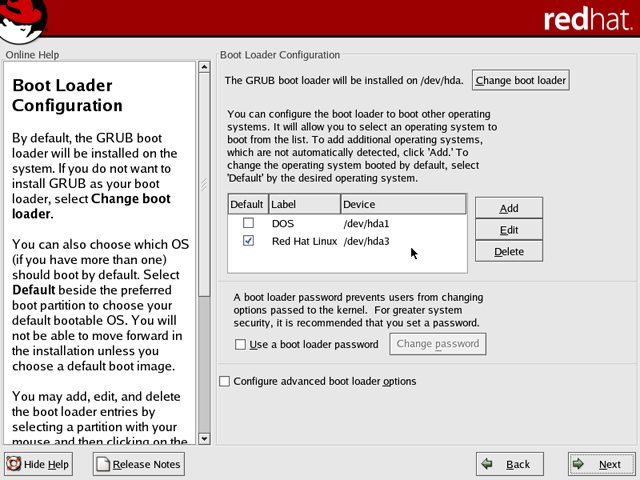
loader (GRUB) as shown in Figure 173.
Select “DOS” as the default. This will mean that Windows XP
will become the default operating system to boot, unless a conscious
choice is made to boot to Linux instead.
Figure 173: Boot loader configuration Under the default checkbox, Linux is selected. This means that when the system boots up, after a short while Linux will boot as the default operating system. If other users, who are familiar with Windows, but not Linux, will be using this PC, be sure to select DOS, which is Windows XP, as the default operating system to boot.
|
Selecting Windows as the
default usually makes sense if anybody not familiar with Linux must
use your computer.
| If you find The PC Guide useful, please consider making a small Paypal donation to help the site, using one of the buttons below. You can also donate a custom amount using the far right button (not less than $1 please, or PayPal gets most/all of your money!) In lieu of a larger donation, you may wish to consider buying the inexpensive print version of How to Build Your Own PC, direct from the author. Thanks for your support! |
|
|
Home -
Table Of Contents - Contact Us
How to Build Your Own PC (http://www.PCGuide.com/byop/) on PCGuide.com
Version 1.0 - Version Date: May 4, 2005
Adapted with permission from a work created by Charlie Palmer.
PCGuide.com Version © Copyright 2005 Charles M. Kozierok. All Rights Reserved.
Not responsible for any loss resulting from the use of this site.
|


