| Get the entire How to Build Your Own PC in affordable hard copy |
Click Here!
|
|
|
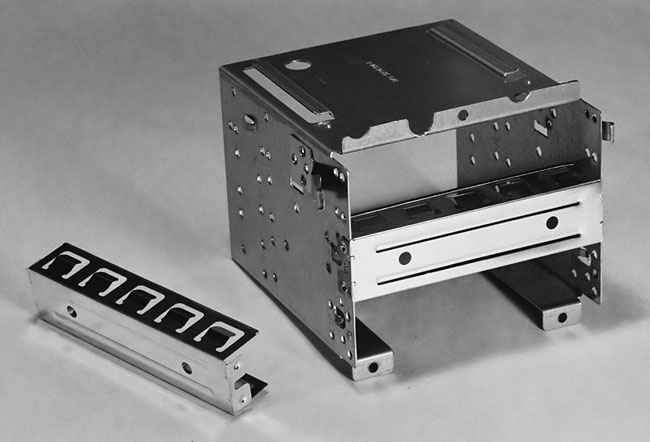
3.5” Drive Cage
Notice that this 3.5" drive cage
has three locations, called drive bays, to attach 3.5" drives. Two of
the three slots are covered by RF shields which are designed to provide
a metal barrier between the inside of the case and the outside world.
When installing a drive, you usually remove the RF shield. These particular
shields just pop out and are easily replaceable (Figure 49).
Figure 49: The 3.5” drive cage removed We have also taken out the metal part known as an RF shield. In the two open spaces, we’ll install the floppy and hard drives.
|
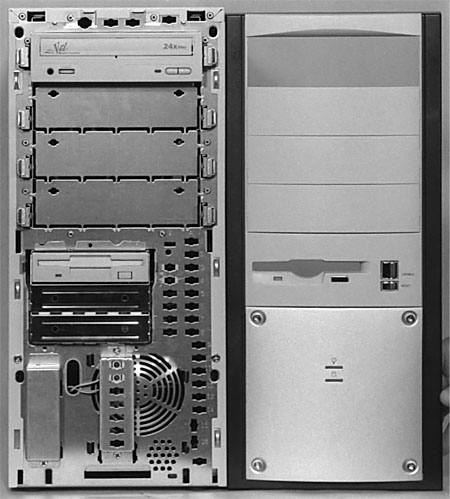
Notice that the top bay
matches up with the slot in the front bezel for the 3.5" floppy drive
(Figure 50).
So, you can’t install the floppy drive in the lower bay unless
you want to use a power saw to cut out a hole in the front of the case,
which you probably don’t want to do! This provides a fancy looking
front for the floppy drive. The actual floppy drive will sit behind
this interface. The button on the case to remove a floppy disk will
engage the button on the floppy drive, itself, and the light from the
LED showing floppy activity on the floppy drive will be channeled to
the front.
Figure 50: Front of case next to bezel Notice that when the floppy drive is installed, it must line up with the hole in the bezel. This determines the bay in which the floppy must be installed.
|
Other cases just have the
floppy drive sit flush with the front of the case. Either style is fine.
| If you find The PC Guide useful, please consider making a small Paypal donation to help the site, using one of the buttons below. You can also donate a custom amount using the far right button (not less than $1 please, or PayPal gets most/all of your money!) In lieu of a larger donation, you may wish to consider buying the inexpensive print version of How to Build Your Own PC, direct from the author. Thanks for your support! |
|
|
Home -
Table Of Contents - Contact Us
How to Build Your Own PC (http://www.PCGuide.com/byop/) on PCGuide.com
Version 1.0 - Version Date: May 4, 2005
Adapted with permission from a work created by Charlie Palmer.
PCGuide.com Version © Copyright 2005 Charles M. Kozierok. All Rights Reserved.
Not responsible for any loss resulting from the use of this site.
|


