[ The PC Guide | Systems and
Components Reference Guide | System Case | Case Switches ]
Power On/Off Switch
The power on/off switch for modern PCs is on the front of the case. (Older PCs, using
the PC/XT or AT desktop form factors, have no power switch on the case at all; the case is
designed so that the on/off switch of the power supply is accessible directly through a
hole in the case, usually at the rear.)
On most Baby AT form factor cases, the power button doesn't in fact do anything other
than mechanically transfer the "push" of your finger to the real metal or
plastic power supply switch that is behind it. That remote switch is in fact part of the
power supply, and so is discussed in that section.
Newer form factors, including the ATX family, NLX and WTX, have a
true power switch on the case, which is connected to the motherboard. The motherboard on these systems turns on and off
the PC, not the power supply directly.
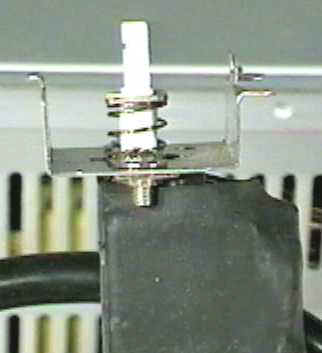
|
On most AT form factor systems, the plastic power
on/off button found
on the front of the case does nothing but transfer the push's energy to a
plastic, spring-loaded power switch similar to the one shown here.
The metal bracket is used to mount the switch to the front of the case. |
Original image © Kamco Services
Image used with permission. |
 Next: Reset Button Next: Reset Button
Home - Search
- Topics - Up
| |
